
Ayush Parchure
Content Writer, Flexprice
Enterprise billing is an iceberg, and the pricing page is the tip you can see, but there are multiple layers underneath that control the actual work, and most founders cannot name a single one.
You only notice the iceberg the day a customer signs a $300K contract with a custom ramp, prepaid token credits, and multi-entity invoicing, and your Stripe setup that handled $1M ARR folds.
So you patch with a Google Sheet for the commitment, a Notion doc for the contract terms, and a Zapier flow firing invoices when the AE remembers. By deal three, sales is rebuilding quotes from memory, and your CSM is hearing about billing disputes from the customer's procurement team.
The real problem here is not complexity but layers that you cannot name. This post here gives you the 11 layers, what each does, and what breaks if you skip one, so you can name the gaps in your stack instead of guessing.
So let’s get started
TL;DR
An enterprise billing layer is the software infrastructure that handles complex pricing, invoicing, and revenue operations for large customers.
It sits between your product and your finance systems, taking usage events in one side and pushing invoices, revenue data, and entitlements out the other.
Event ingestion and metering captures every usage event with idempotency and multi-tenant attribution, and a leaky pipeline corrupts every invoice above it.
Aggregation rolls events into queryable meters, and without it, you cannot answer how a customer's spend breaks down by model, region, or end-user.
Pricing and rating turn metered usage into money using a versioned price book, and skipping price versioning makes every upstream price change a week-long fire drill.
Entitlements tells your product what each customer is allowed to do, and hard-coding it in application code turns your codebase into customer-specific conditionals nobody wants to touch.
Contracts and subscriptions store the structured representation of every deal, and skipping it means contract terms live in a Google Doc and renewals turn into Slack archeology.
Commitments, credits, and balances track every credit a customer holds and apply them in the right order, and getting that order wrong is how you over-bill or quietly burn through commitments before renewal.
Invoicing compiles every layer below into one document and stays recomputable from raw events.
Payments and dunning cover the work between sending an invoice and getting cash in the door.
Revenue recognition and finance integrations keep your billing system in line with ASC 606 and IFRS 15.
Quote to cash and CRM sync bridges Salesforce and your billing system, and skipping it turns every closed deal into a manual re-keying exercise that introduces errors at scale.
Analytics and dashboards serve both your team and your customer, and skipping the customer-facing view loses you enterprise AI deals before procurement even looks at the contract.
Flexprice covers 8 of the 11 layers natively and integrates cleanly with Stripe, QuickBooks, Zoho, Salesforce, and HubSpot for the remaining three, with its strongest coverage on the layers AI founders need most.
What is an enterprise billing layer?
An enterprise billing layer is the software infrastructure that handles complex pricing, invoicing, and revenue operations for large customers whose contracts do not fit self-serve checkout flows.
This sounds simple at first, but when you go in depth, it gets complicated.
When you sell to a Fortune 500 buyer or a mid-market account on a custom deal, your billing system pushes Stripe Checkout to do the things it was never designed for. Here you are dealing with negotiated rates, hybrid pricing, prepaid credits, usage commitments, multi-entity invoicing, and finance teams on both sides who want everything reconciled to the cent.
Each layer inside enterprise billing owns one of those jobs, and they stack on top of each other in a strict order:
Event ingestion feeds metering
Metering feeds rating
Rating feeds invoicing
Invoicing feeds revenue recognition
If any layer underneath produces bad data, every layer above it quietly ships wrong numbers to your customers. That is why you cannot evaluate billing tools from the pricing page or a checkout demo. You need to know which layers a tool actually owns, which ones it expects you to build, and where the seams between them sit.
Through the rest of this guide, you will get the vocabulary for all 11 layers, what each one does, and how a decision in one ripples through the rest of your stack.
Where the enterprise billing layer sits in your SaaS stack
The enterprise billing layer sits between your product, where usage actually happens, and your finance system is the place where money gets recognized. Events flow in from one side and invoices, revenue data, and entitlements come out the other.
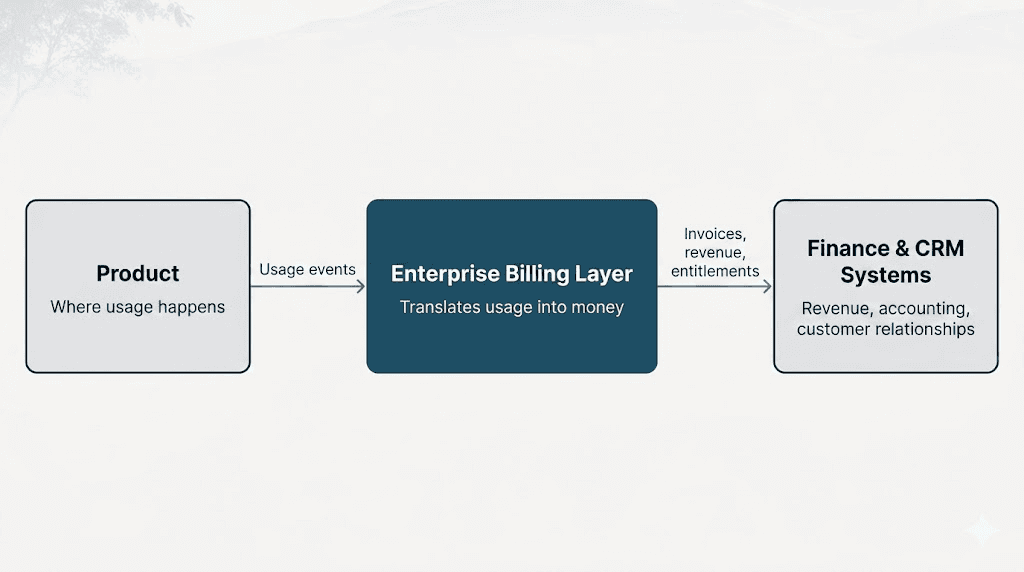
You can think of it as the translator in the middle of your stack:
The product on the left generates usage and customer activity
The enterprise billing layer in the middle turns that activity into money
Finance and CRM systems on the right handle revenue, accounting, and customer relationships
Here is what actually lives inside the enterprise billing layer.
Contract modeling
Contract modeling turns a signed order form into structured billing entities that your system can act on. It holds platform fees, usage commitments, credit grants, entitlements, overage rates, ramps, true-ups, and custom discounts in one place.
Enterprise contracts almost never match your public price list, so this layer represents the personalized terms exactly the way sales and the customer agreed to them.
Usage metering
This layer ingests raw events from your product (API calls, minutes, tokens, seats, anything you charge for) and buckets them against the right meter for each customer. It then applies tiered, volume, or package pricing based on that customer's contract.
Once you have it running, it becomes the source of truth for any usage question that sales, finance, or your customers ask.
Invoicing
Invoicing generates the actual bill on the customer's billing cycle, whether that is monthly, quarterly, or annual. It also handles:
Prorations and mid-cycle changes when a customer upgrades, adds seats, or expands
Multi-currency and tax calculations across regions
Prepaid balances and commitments, so credits burn down before overage kicks in
Entitlements
Entitlements tell your product what each customer is actually allowed to do through feature flags, quotas, and rate limits. The rules come straight from the contract, and your product reads them in real time.
This keeps your engineers from hard-coding customer-specific logic in application code.
Workflows around the money
Generating the invoice is only half the job. Getting paid and keeping Salesforce, NetSuite, and Stripe in sync is the other half, and that is what this layer covers:
Dunning, payment retries, and renewals, so revenue does not slip through the cracks
CRM integrations with Salesforce and HubSpot, so sales see the live billing status on every account
ERP, tax, and payment integrations with NetSuite, Avalara, and payment processors like Stripe.
When these five pieces work together, your billing system stops being a manual cost center and starts running on its own.
The 11 layers of enterprise billing
Each layer below covers what it does, the moving parts inside it, and what breaks if you skip it.
This section will help you with a working vocabulary of enterprise billing architecture that you can actually use next time for a vendor demo. The order matters because every layer leans on the one below it.
Event ingestion and metering
Event ingestion and metering is the foundation of every enterprise billing system, and the layer that founders often underestimate. Event ingestion captures every usage event your product emits and attributes it to the right customer at the speed your product fires events.
The moving parts inside it
High-throughput ingestion with idempotency keys so retries do not create duplicate billing events
Multi-tenant attribution so events never bleed across customer accounts
It can handle events that arrive late without breaking existing invoices
It lets you reprocess past data if something went wrong earlier
AI-specific signals like input tokens, output tokens, cached tokens, and tool call counts, often emitted as four separate dimensions on a single chat completion
What breaks if you skip it
If your ingestion pipeline drops events, batches them late, or misattributes them across tenants, every layer above produces invoices you cannot defend.
You also lose the ability to recompute when a customer disputes a charge; this is where customer trust breaks
Aggregation
Raw events on their own do not answer billing questions. You need meters, which are pre-aggregated rollups that turn a firehose of events into things like "total output tokens this month for customer X on model Y."
The moving parts inside it
Sum meters for token counts, API calls, minutes, and any additive measurement
Max meters for peak seat counts or concurrent users during the period
Unique count meters for distinct end users, projects, or workspaces
Bucketed time grains at the hour, day, and billing-period levels so you can reuse meters for analytics and invoicing
What breaks if you skip it
A well-designed meter layer lets you slice by model, region, environment, or end-user without re-ingesting raw events.
AI founders who skip this layer cannot answer the first question their CFO will ask within three months: "How much did this customer spend on GPT-4 vs Claude vs Gemini last quarter?"
Pricing and rating
Aggregated meters are inert until you put a price on them. Pricing and rating turn metered usage into money using your price book, and it is where your published pricing meets the bespoke terms that your AEs negotiated last quarter.
The moving parts inside it
Tiered, volume, package, per-unit, and graduated pricing with minimums, caps, and floors
Customer and subscription-level overrides for negotiated enterprise terms
Ramps and step-ups, so a three-year deal with rising commitments computes correctly without manual intervention
Price versioning that pins each historical invoice to the price book active at the time
What breaks if you skip it
If your pricing layer cannot version prices, every upstream price change becomes a week-long scramble across engineering, finance, and customer success.
And if you cannot model overrides at the customer level, every enterprise deal gets shoehorned into your public price book and quietly under-bills the negotiated terms.
Entitlements
Pricing tells the system what to charge for. Entitlements tell your product what each customer is actually allowed to do. These are two different questions, and they need two different sources of truth.
The moving parts inside it
Feature flags that turn paid features on or off based on the customer's plan or contract
Quotas that cap how much a customer can use in a period, like 1M tokens per month or 500 seats
Rate limits that cap short-window throughput, like requests per second
Seat counts that control licensed access, with soft warnings or hard cutoffs when the limit hits
Real-time evaluation so your product can ask "is this allowed?" on every single request without slowing the user down
What breaks if you skip it
When you skip this, your application code starts making billing decisions it should not be making. Founders almost always start by hard-coding entitlements directly in the product, usually inside if customer.id == "acme_corp" checks.
Two things break from there.
First, your engineers cannot ship features cleanly anymore. Every new release has to account for the special cases of your top ten enterprise customers, and the codebase turns into a thicket of customer-specific conditionals nobody wants to touch.
Second, your contract terms drift away from what the product actually enforces. Sales sells one thing, the contract says another, and the product behaves like a third.
The customer hits a limit they did not know about, and your CSM has no clean way to fix it without an engineering ticket.
Contracts and subscriptions
Every charge and every entitlement traces back to one thing: the contract. This layer takes a signed PDF and turns it into structured data your billing system can read and act on, instead of relying on a human to remember what was negotiated.
The moving parts inside it
Term: contract length, billing frequency, fiscal year alignment
Platform fees: flat platform charges, separate from usage
Committed usage: minimum spend or minimum consumption units
Credit grants: pilot credits, promotional credits, prepaid balances
Ramps: scheduled increases in commitment or price across years
Discounts and true-ups: negotiated discounts and end-of-year reconciliations
Auto-renewal terms: notice windows, renewal pricing, opt-out clauses
Amendments: every change layered on top of the original signature, with effective dates
What breaks if you skip it
Your contracts stop being a system of record and become tribal knowledge. The terms live in a Google Doc that only the AE remembers signing, the usage commitment lives in a spreadsheet on the CFO's laptop, and your renewal motion is a Slack thread between sales and finance the week before the contract expires.
The first time this really hurts is at the renewal. Nobody can pull up the original commitments, the amendments, and the discount schedule in one view. So you either under-charge to keep the relationship clean, or over-charge and trigger a procurement fight.
Commitments, credits, and balances
This layer is the running balance sheet for every customer. It tracks how much credit they have, what type of credit it is, and the order in which it gets used up before they cross into paying overage rates.
The moving parts inside it
Prepaid dollars that the customer paid up front
Committed usage they agreed to consume during the term
Pilot credits carried over from the original POC
Promotional grants layered on at renewal as a sweetener
Draw-down order that the contract specifies, usually expiring credits first, then committed usage, then overage rates
Scope and expiration on each balance, since some credits only apply to specific products, models, or time windows
What breaks if you skip it
You ship invoices that the customer can argue with, and you cannot defend. AI companies feel this hardest, because deals shaped like "$50k prepaid against tokens, then $0.002 per 1k tokens after" depend entirely on this layer applying balances in the right order.
Either you over-charge by skipping a credit you should have applied, or the customer catches it during their monthly review. Or you quietly burn through committed dollars in the wrong sequence, and the customer arrives at renewal expecting a refund or a true-down you did not see coming.
This is why Segwise chose Flexprice to solve this layer specifically. Their founding engineer, Kush Daga, flagged credit visibility as the single problem they had been trying to solve in-house, and they now run with 100% visibility on customer credit usage out of the box.

Invoicing
When the billing cycle ends, this layer takes everything that happened underneath (contract terms, metered usage, applied credits, taxes) and compiles it into one document that the customer actually pays.
Enterprise invoices look nothing like a Stripe self-serve receipt, so this layer has to handle a long list of edge cases cleanly.
The moving parts inside it
Line items that group, label, and roll up usage clearly enough for procurement to read
Prorations for mid-cycle changes like upgrades, seat adds, or contract amendments
Taxes across regions, including reverse charge and tax exemption handling
Credits and adjustments applied in the correct order against the right line items
Multi-currency with locked exchange rates per invoice
Multi-entity billing for customers who want one master invoice or separate invoices per legal entity
What breaks if you skip it
You lose the ability to fix mistakes cleanly. A healthy invoicing layer can be regenerated from the raw events behind it, so if your meter was wrong for two weeks, you can fix the meter, regenerate the invoice, and have every line item still trace back to the events that produced it.
Without that property, every billing dispute becomes a manual investigation across spreadsheets and Slack threads. Every fix becomes a credit memo bolted onto the wrong invoice instead of a corrected version. Finance loses trust in the numbers, and your enterprise customers lose trust in your billing entirely.
Payments and dunning
Sending an invoice is not the same as collecting on it. This layer covers everything that happens between the invoice going out the door and the cash landing in your bank account.
The moving parts inside it
Multiple payment rails: Stripe and other card processors, ACH, wire, and check
Dunning sequences tuned for B2B, not B2C, with escalation to the AE and CSM rather than just the billing email address
Payment application that handles partial payments, overpayments, and one payment covering multiple invoices
Write-offs and adjustments with audit trails for finance
What breaks if you skip it
You quietly write off revenue you could have collected. Self-serve billing leans on card retry logic because most self-serve customers pay by card. Enterprise customers pay NET 30 or NET 60 by ACH or wire, which means card retries do not help you at all.
Without a real AR aging view, your finance team has no idea which invoices are 30, 60, or 90 days late until they pull a manual report. By the time they catch a past-due invoice, the AE has moved on to the next deal, the CSM has not flagged it, and the customer has forgotten the invoice exists.
A single Salesforce-routed reminder usually would have fixed it.
Revenue recognition and finance integrations
Receiving payment is a straightforward thing, but accurately reporting that revenue to accountants, auditors, and investors is a more complex responsibility. This layer makes sure every dollar your billing system collects is recognized in the right month, in the right account, and in line with accounting standards.
The moving parts inside it
ASC 606 and IFRS 15 compliance out of the box, the two standards every SaaS auditor will check against
Ratable recognition of subscription fees spread evenly over the contract term, instead of all at once when the invoice is paid
Contract modifications handled cleanly, with the original contract preserved for audit
Sub-ledger detail that ties every recognized dollar back to a specific contract, line item, and customer
Integrations into NetSuite, QuickBooks, or Sage Intacct, plus dedicated rev rec tools like Zone & Co, or Leapfin
What breaks if you skip it
Most founders ignore this layer until an investor's diligence team asks for ASC 606-compliant revenue schedules and the controller realizes the billing system was never built to produce them.
Then you spend a full quarter upgrading recognition logic on top of a billing system that does not have the audit trail to support it. Your fundraising timeline slips, your auditors find restatements in prior periods, and the cleanup eats engineering and finance time you needed for actual product work.
Quote to cash and CRM sync
Sales lives in your CRM, and billing lives in your billing system. This layer acts as a bridge between the two, so a closed-won deal in Salesforce automatically becomes a live contract in your billing system without anyone re-typing the line items.
The moving parts inside it
CPQ tooling, like Salesforce CPQ and DealHub, for building quotes against your price book
Order form generation with the negotiated terms baked in, so what the customer signs matches what gets billed
Approval workflows for non-standard discounts, payment terms, or commitments
Closed-won handoff that creates the contract object in your contracts layer automatically when the deal closes
Two-way CRM sync so live billing status, AR aging, and renewal dates show up on the Salesforce or HubSpot account view
What breaks if you skip it
Your AE pastes line items from the order form into the billing tool, finance double-checks the numbers, and Customer Success learns the contract terms by reading the closed-won Slack thread.
That works at ten enterprise customers, but at fifty, you are mis-billing customers because someone fat-fingered a price, missing renewals because nobody synced the dates back to Salesforce, and burning AE time on data entry that should have been automatic.
Analytics and dashboards
The top of the stack is reporting, and it serves two different audiences. Internally, your team needs to see how the business is doing. Externally, your customer needs to see how their usage is tracking against their contract. Most billing systems do one well and forget about the other.
The moving parts inside it
For your team:
ARR and NRR are tied directly to the same data that your invoices come from
Cohort retention by customer segment, plan, or signup quarter
Usage trends sliced by model, region, customer, and end-user
Margin reporting that compares revenue to the upstream model or infrastructure cost
For your customer:
Real-time consumption against commit, so they always know where they stand
Drill down by user, project, or workspace
Forecasted overage based on current burn rate
Exportable usage data for their internal finance team
What breaks if you skip it
When you skip this, two different things break, one for each audience.
If your internal analytics pulls from a different source than your invoices, your billing system will eventually disagree on a number that matters. That disagreement always surfaces in the worst possible meeting, like a board update or a fundraise diligence call, and once your investors lose trust in your numbers, it is hard to win back.
On the customer side, enterprise AI buyers will not sign without a live dashboard. Six-figure usage-based contracts only close when the customer can see exactly what they are spending in real time. The OpenAI usage dashboard :
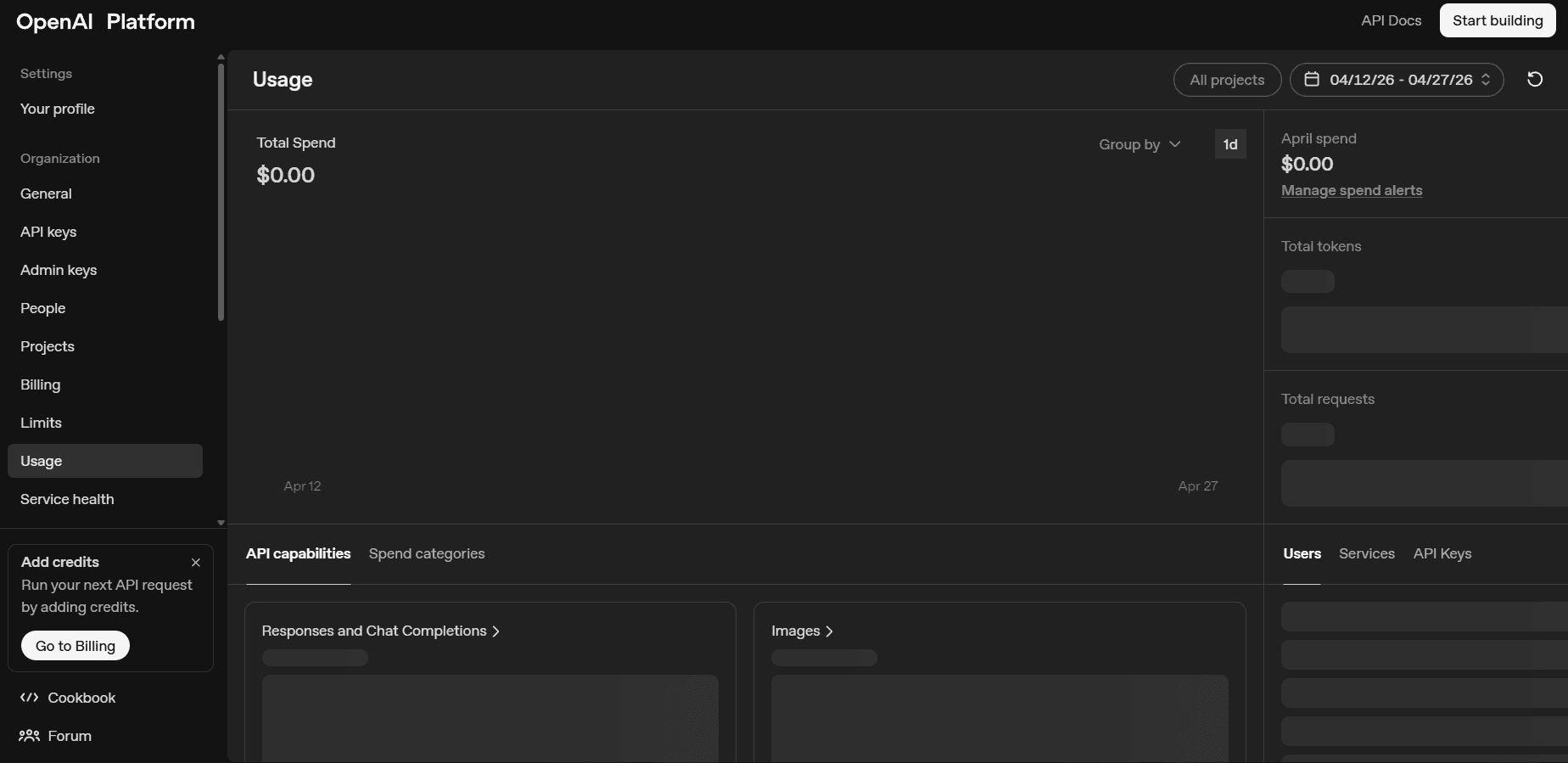
And the Anthropic console is the public reference point for what enterprise buyers now expect by default.
How Flexprice maps to the 11 layers of enterprise billing
Flexprice is built specifically for the layers Stripe Billing leaves unsolved. It covers 8 of the 11 layers natively and integrates with best-in-class tools for the remaining 3. The goal of this section is to show you, layer by layer, what Flexprice handles directly and where you still need a partner system, so you can scope your stack honestly instead of guessing.
Coverage of Flexprice
Sr | Layer | Flexprice coverage |
1 | Event ingestion and metering | Native |
2 | Aggregation and meters | Native |
3 | Pricing and rating | Native |
4 | Entitlements | Native |
5 | Contracts and subscriptions | Native |
6 | Commitments, credits, and balances | Native |
7 | Invoicing | Native |
8 | Payments and dunning | Partial (payments native, dunning via integration) |
9 | Revenue recognition and finance integrations | Partial (analytics native, ASC 606 via QuickBooks and Zoho) |
10 | Quote to cash and CRM sync | Integration (via Stripe, Chargebee, and webhooks) |
11 | Reporting and usage dashboards | Native |
What Flexprice handles natively
These are the eight layers where Flexprice owns the work end-to-end, no extra tooling required.
Event ingestion API with single and bulk event endpoints for Layer 1
Meters with custom dimensions and standard aggregations for Layer 2
Plans, prices, bulk price creation, and per-customer overrides for Layer 3
Entitlements API with real-time read endpoints for Layer 4
Subscription schedules, draft and activate flows, ramps, and amendments for Layer 5
Wallets and credit grants with auto draw-down before overage for Layer 6
Draft, preview, finalize, void, and recompute invoice flows for Layer 7
Usage analytics, customer usage summary, and combined revenue and cost analytics for Layer 11
If you want to see the actual API surface for any of these, the Flexprice docs walk through each endpoint with example requests and responses.
Where Flexprice pairs with other tools
The remaining three layers are the ones where most billing tools expect you to bring your own tool. But Flexprice integrates with these layers cleanly instead of fighting them.
Layer 8 Dunning and collections: pair with Stripe or your existing AR tool
Layer 9 Revenue recognition: sync to QuickBooks and Zoho Books today, with NetSuite on the roadmap
Layer 10 CRM and CPQ: webhook-driven sync from Salesforce or HubSpot, no native CPQ connector yet
The honest framing here matters. These are the layers where vendor lock-in usually hurts you most, so Flexprice does not try to lock you in. Your existing AR tool and your existing CRM keep doing what they already do well.
What Flexprice does not try to be
Flexprice is not a CRM, an accounting system, or a dunning tool. It plays well with Stripe, QuickBooks, Zoho, Salesforce, and HubSpot through APIs and webhooks, and stays out of the way of the systems your team already runs. It is enterprise-grade, open source usage based billing infrastructure for AI and SaaS companies. It can be deployed in your own VPC, on-prem, or on Flexprice's managed cloud.
If you go with a single vendor for billing with accounting, CRM, and collections, you should look at full-suite tools, but those tools rarely model usage-based AI contracts well, which is precisely the gap Flexprice was built to fill.
The side-by-side breakdown of Flexprice vs Stripe covers this trade-off in more detail, with a layer-by-layer comparison of what Stripe Billing handles and what it leaves on your engineering team's plate.
Why this coverage matters for AI founders
Layers 1, 2, and 6 are exactly where AI companies need the most help, and for these layers, Flexprice is the strongest choice among the other tools. Event ingestion at scale, multi-dimensional metering across models and customers, and credit grants with auto draw-down are first-class entities in the platform, not workarounds bolted onto a self-serve billing tool.
Three things shift the moment you stop fighting your billing stack:
Per-customer pricing and credit grants are modeled as native objects, so a custom enterprise deal does not require a code change
Margin per customer is visible in real time because cost and revenue analytics live in the same system
Contract setup is faster because the structured fields for ramps, commitments, and credits are already in the data model
The result is fewer billing fires, faster contract setup, and a finance team that does not spend month-end reconciling Stripe payouts against a Notion doc.
Wrapping up
Enterprise billing looks simple from the outside, but as you’ve seen, it’s a stack of decisions that build on each other. Miss one layer, and the problems don’t show up immediately; they surface later as invoice disputes, broken reports, or awkward renewal conversations.
A few things to keep in mind as you think about your own setup:
Start from the bottom. Clean event ingestion and metering save you from most downstream issues.
Treat contracts as structured data, not PDFs your team has to interpret manually.
Pricing flexibility matters more than pricing features. Enterprise deals rarely match your public plans.
Make sure your system can explain every number it produces. If you can’t trace it back, your customer won’t trust it.
The goal isn’t to build a “perfect” billing system on day one. It’s to understand where complexity will show up as you grow, and make sure your stack can handle it without turning into a manual mess.
If you get that right, billing stops being something you fight every month and becomes something your business can rely on.
What is enterprise billing?
What are the layers of an enterprise billing system?
How is enterprise billing different from Stripe Billing?
What is the best enterprise billing platform for AI companies?
What is credit-based pricing in enterprise billing?