
Aanchal Parmar
Product Marketing Manager, Flexprice
A subscription pricing model is the structure a company uses to charge recurring fees for a product or service. Six models run nearly every SaaS and AI business today: flat-rate, tiered, per-seat, usage-based, credit-based, and hybrid.
This post gives you 10 real examples, actual plan shapes, real numbers, and the billing mechanics under the pricing page. We run billing at Flexprice for Vapi, and Simplismart, and we watch founders pick the wrong model on day one more often than we'd like.
Key Takeaways
Six pricing models run every SaaS on the market today: flat-rate, tiered, per-seat, usage-based, credit-based, and hybrid. We'd pick based on how your value actually scales, not what's trendy.
Flat-rate wins when value is obvious. Dropbox ($9.99 Plus) and Calendly ($10 Standard) show you can ship one price and still build a billion-dollar business.
Tiered pricing rewards volume. The per-unit price drops as customers move into higher bands. Kit charges in subscriber bands, Kinsta in traffic bands, so bigger customers get a built-in discount without you negotiating anything.
Per-seat is the B2B default, but fairness separates winners from losers. Slack's 14-day auto-credit for inactive users is the trust signal that closes enterprise deals.
Role-based seats unlock hidden expansion revenue. Figma charges $16 (Full), $12 (Dev), and $3 (Collab), so the whole company buys in instead of just the designers.
AI products default to credits, not tokens, OpenAI, and ElevenLabs all run prepaid credits because it hides messy token math and absorbs model price churn for you.
Usage-based with passthrough builds buyer trust. Vapi breaks every minute into platform fee, LLM, voice, STT, and telephony at cost, so the margin stays honest and defensible.
Every mature SaaS eventually goes hybrid. Slack, Dropbox, and Notion all started with one model and now run multiple. Simplismart shows what a purpose-built hybrid looks like (platform fee plus four usage meters plus GPU hourly rates).
Recurring revenue is genuinely more profitable when you run it well: a KeyBanc survey of 100 software companies found a median gross profit margin of 80% on subscription and SaaS revenue.
Three questions to pick your model: what's your primary value driver today, how will it compound in 18 months, and can your billing stack run both.
The pricing page is easy. The billing stack is the work. Moving from per-seat to hybrid on a Stripe-only stack can take a quarter or more of engineering time. Flexprice runs every model in this post out of the box (plans, meters, entitlements, credit grants, subscription schedules).
What are the best subscription pricing model examples?
Dropbox, Calendly, Kit, Kinsta, Slack, Notion, Figma, Vap, and Simplismart are ten of the clearest real-world examples, each running a different pricing model with real, published numbers.
Before you copy any of these brands, figure out which bucket you're in. Pick the wrong subscription-based pricing model, and you leave money on the table or scare off your first 100 customers.
Here's the map:
Pricing model | What it looks like | Brand in this list
|
|---|---|---|
Flat-rate | One price, one feature set | Dropbox, Calendly |
Tiered | Unit price drops as volume grows (bands with built-in volume discounts) | Kit, Kinsta |
Per-seat | Price scales with users | Slack, Notion, Figma |
Usage-based | Post-paid, price scales with consumption | Vapi |
Hybrid | Seats plus usage plus add-ons | Simplismart |
A quick check helps you figure out which pricing model fits your use case:
If your product has one obvious value, like storage, a bot, and a calendar, then start with a flat rate.
When your customers buy more of one clean metric (contacts, visits, messages) and you want to reward volume, go with tiered pricing. Set a base rate for the first band, then drop the per-unit price in each higher band.
If your users are humans who collaborate, per-seat pricing works.
When your value scales per minute or per API call, and customers are fine paying at month-end, you're in usage-based pricing.
If you want budget predictability for the buyer and prepaid revenue for you, and you're selling AI calls, tokens, or generations, you're credit-based.
You need a hybrid pricing model if you sell to teams and your AI or add-on revenue is growing faster than seat revenue.
One model most lists skip entirely: value-based pricing, where you charge based on the outcome or perceived value the customer gets rather than a clean usage or seat metric.
It's real, but in practice it rarely stands alone. In this list, Figma's role-based seats and Simplismart's per-workload meters are both value-based pricing wearing a hybrid or per-seat coat, since the price tracks what each unit is actually worth to the buyer, not just a headcount or a flat fee.
We cover the full landscape, including value-based pricing on its own terms, in our guide to SaaS pricing models.
Here's the thing most founders miss. These subscription pricing models aren't permanent. Slack started per-seat. It runs hybrid now. Notion started per-seat. It added a usage-metered AI add-on. Your subscription pricing will scale the same way. But the question is whether your billing stack can follow.
Now let's see how the 10 biggest brands actually run these.
1. Dropbox
Pricing model: Flat-rate consumer plans plus per-seat team plans
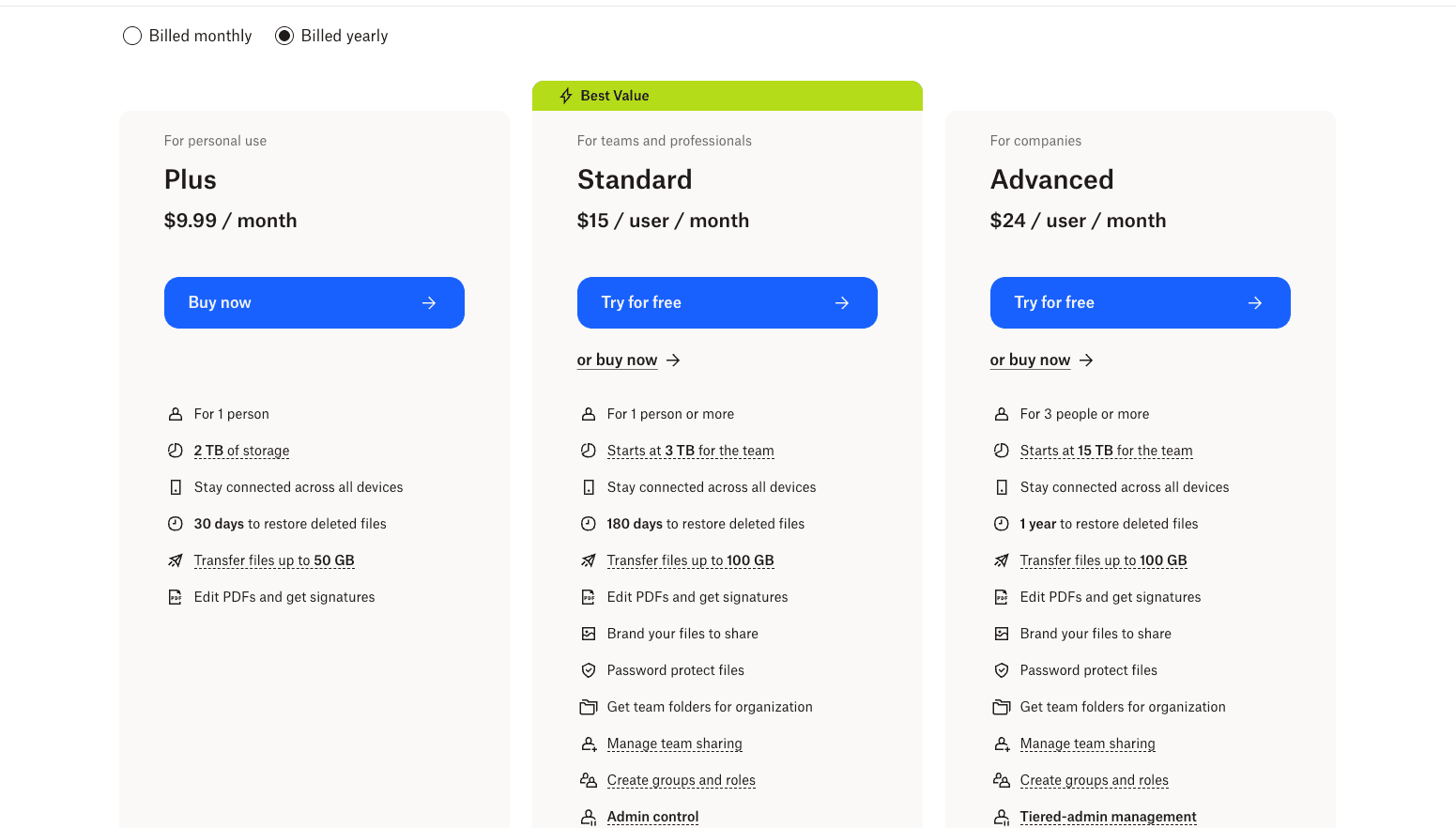
Dropbox sells storage in five neat shelves. Each plan is sized for a different buyer, and the price jumps are deliberately wide so nobody is stuck in the wrong tier.
Here's how these pricing plans work out:
Basic Free: 2 GB of storage for one person. This is the "try it before you buy it" plan. Most individuals outgrow it the moment they back up a phone.
Plus ($9.99/month): 2 TB of storage for one user. The default plan for a freelancer, student, or household that keeps photos, videos, and documents in one place. Flat fee, no per-user math, billed monthly.
Standard ($15/user/month): 3 TB or more of shared team storage, billed per seat. This is where Dropbox shifts from consumer to B2B. A team of five pays $75/month, and everyone accesses the same pool. Shared folders, admin controls, and team-level billing land at this tier.
Advanced ($24/user/month): 15 TB or more of shared storage, minimum 3 users. Designed for larger teams that need more storage per seat and tighter admin tools (role-based permissions, extended version history, priority support). A 10-person team at Advanced runs $240/month.
Enterprise (Custom pricing): For organizations that need SSO, audit logs, dedicated account management, and committed-use discounts. Priced via sales call, usually negotiated on a yearly contract.
The clever move here is the jump from $9.99 solo to $15 per user at Standard. Dropbox quietly shifts from a consumer flat-rate to a B2B per-seat at the exact moment a team starts buying. Same product, same brand, but the pricing model changes to match how the buyer actually pays.
That jump is the revenue lever behind 18 years of Dropbox subscription pricing.
How does this help you?
If you are pricing a product with one clear value (storage, a calendar, a scheduling tool), Dropbox shows you that you can launch at $9.99 and still build toward a multi-billion dollar business.
You do not need a complex tier matrix on day one. You can start with one price, let individuals buy in, and wait for team demand before you design B2B pricing. That alone buys you 6-12 months of focus on your product instead of your billing engine.
Flat-rate works best when the value is obvious. If you can describe your product in one sentence, flat-rate is the fastest way to get buyers to say yes.
2. Calendly
Pricing model: Flat-rate per seat
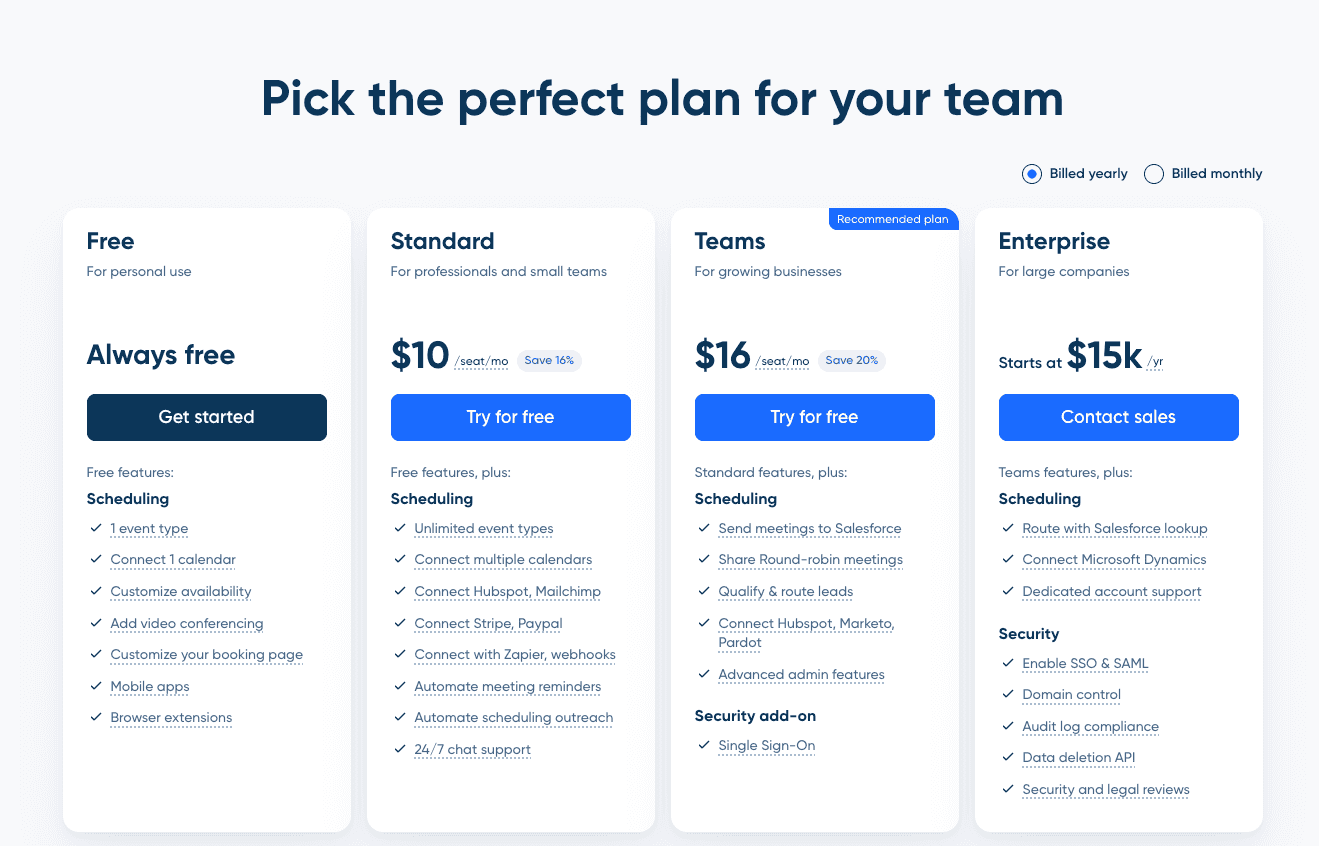
Calendly keeps its pricing page intentionally simple. Four plans, each priced for a different user: a solo professional, a power user, a small sales team, and a security-conscious enterprise:
Free: One event type, one calendar connection, plus mobile and browser apps. Enough to schedule meetings as an individual. This is the tier most solo users stay on for months before needing more.
Standard ($10/seat/month): The default paid plan. Unlocks unlimited event types, multiple calendar connections, Zoom/Google Meet integrations, and branding customization. A freelancer or consultant usually lands here.
Teams ($16/seat/month): Built for sales and customer-success teams. Adds Salesforce routing, round-robin meetings, lead qualification forms, and advanced admin controls. A five-person sales team at Teams runs $80/month on annual billing.
Enterprise starts at $15,000/year: Priced on a yearly contract, not per seat. Adds SSO/SAML, domain control, Microsoft Dynamics integration, and a dedicated account manager. The jump from Teams to Enterprise is steep by design; it gates the security and compliance features large buyers require.
Calendly is product-led growth with a pricing page that stays out of the way. You hit a feature wall, you upgrade in three clicks. No sales call, no talk to our team, dead end, until you cross into Enterprise.
Two things make this model work: the free tier is genuinely useful (one calendar connection covers the basic case), so users come in without any friction, and the annual discount (16% on Standard, 20% on Teams) nudges buyers onto a yearly commitment the moment they decide to pay at all.
How does this help you?
If you are a founder thinking about a product-led growth motion, Calendly is the cleanest template you can copy. The free plan removes friction from every step. If your pricing page has "Contact sales" for anything short of enterprise, you are already leaving self-serve revenue on the table.
You can copy Calendly's shape exactly: a useful free tier, one paid plan, one team plan, enterprise at the top, and most B2B SaaS in 2026 would be better off with it.
The 16-20% annual discount is the easiest recurring revenue lever you can add without touching your product. When your buyer is weighing monthly vs. annual, that discount is the nudge that gets you twelve months of cash upfront instead of one.
Flat-rate per seat is the cleanest starting point for a product that humans use individually. Keep the free tier useful, keep the upgrade path fast, and add an annual discount the moment you can justify it.
3. Kit, previously ConvertKit
Pricing model: Tiered by subscriber count with an annual discount
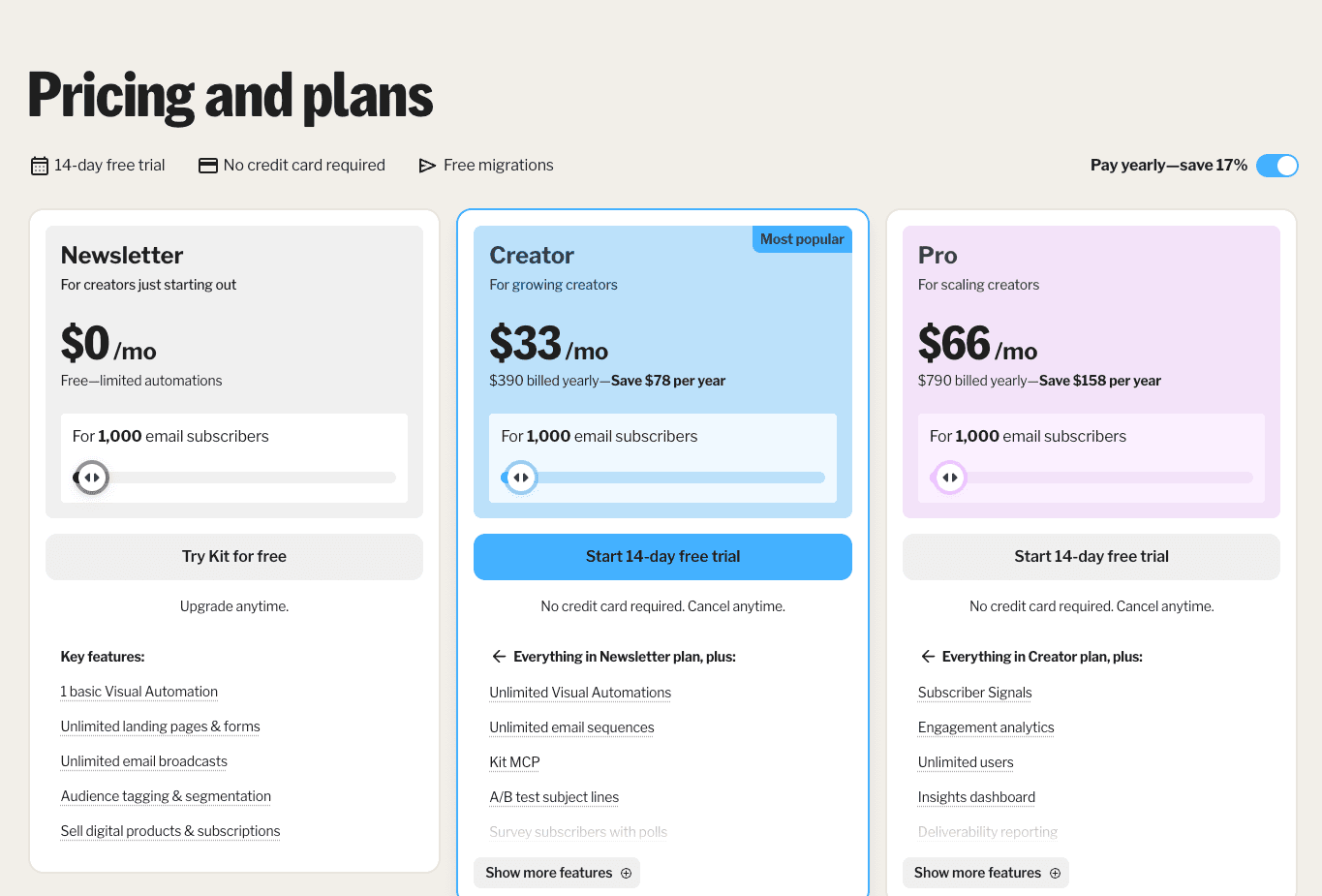
Kit prices the thing a creator actually cares about: how big their email list is. Three plans, each priced in bands by subscriber count. The bigger your list, the more you pay and the more features you unlock:
Newsletter: Free up to 10,000 subscribers. Unusually generous for the category. You get unlimited landing pages, unlimited signup forms, unlimited email broadcasts, audience tagging, segmentation, and one basic Visual Automation.
Creator ($33/month or $390/year): Starts at 1,000 subscribers and scales upward with list size, so a creator with 5,000 subscribers pays more than one with 1,500. Adds unlimited Visual Automations, unlimited email sequences, A/B subject-line testing, removes Kit branding from emails, and 24/7 support. This is the plan most paying creators sit on.
Pro ($66/month or $790/year): Same subscriber-band pricing starting at 1,000 subs. Adds deliverability reporting, subscriber engagement scoring, collaborative editing for teams, advanced A/B testing (not just subject lines), and a newsletter referral system. Built for creators running a newsletter as a real business.
Kit is the cleanest example of tiered subscription pricing tied to one clear metric. As your list grows, you move into higher subscriber bands. The total bill goes up, but the cost per subscriber drops, so bigger creators get a built-in volume discount. Fair on paper, clear to the buyer: more subscribers, more value, better unit economics.
The pricing works because the free tier is useful enough that a creator commits to Kit before they ever consider paying. By the time the list crosses 1,000 subscribers, the creator needs automations or deliverability reporting, and the paid tiers become obvious upgrades. The price grows with the list, not with an arbitrary feature wall.
How does this help you?
If your product's value grows with one clean metric (contacts, seats, rows, sites, visits, messages), Kit shows you how to price it without inventing a complicated plan matrix.
With Kit, you price in bands: here is what the first 1k costs, the next 9k, the next 40k. Each band is cheaper per unit than the one below it. Your buyer understands it in ten seconds, gets rewarded for growing, and your revenue compounds with theirs automatically.
You don't need to invent feature gates to justify a higher price. The metric does that work for you. That means you spend less time in pricing meetings arguing about which feature should live on which tier, and more time shipping features your power users actually want. If you are in a category where usage and value are tightly coupled, this is the simplest subscription pricing model you can run.
4. Kinsta
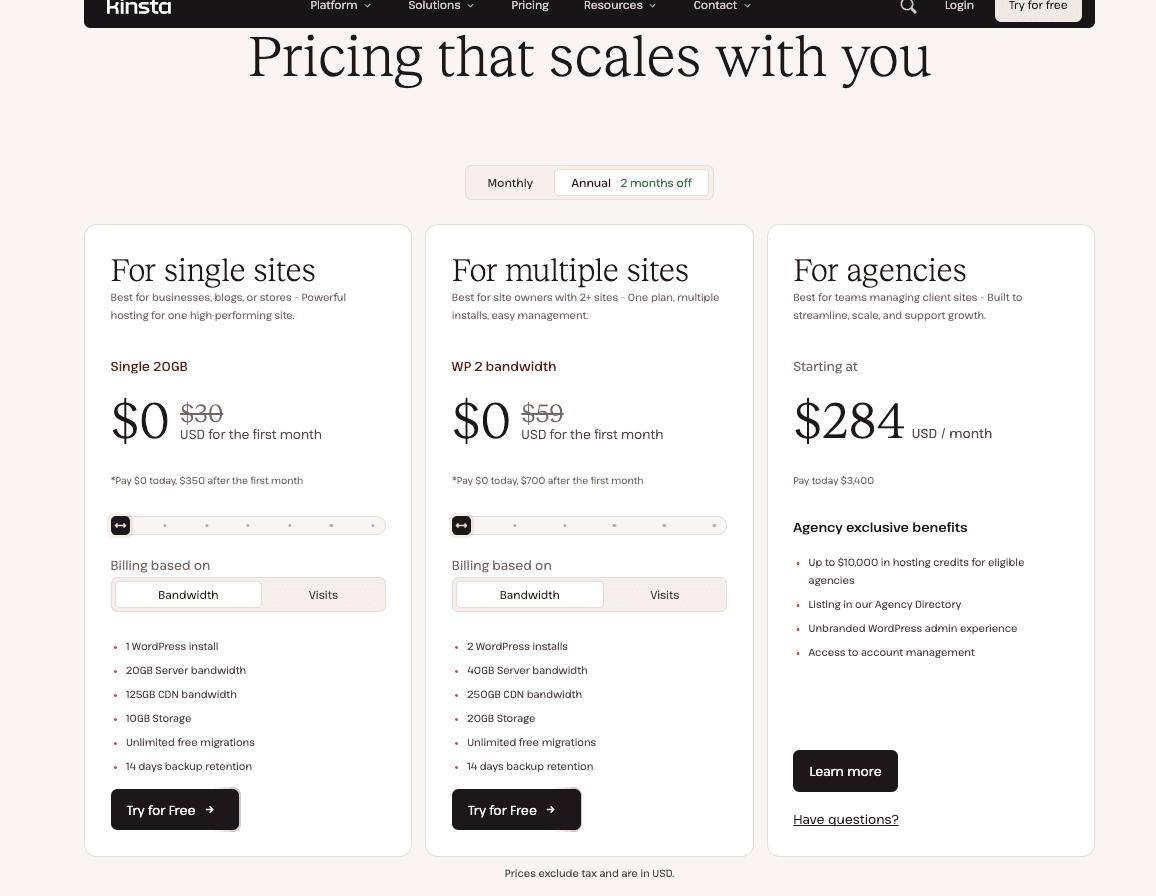
Pricing model: Tiered by server bandwidth (GB) and site count, with monthly or annual billing
Kinsta prices hosting based on how many sites you run and how much bandwidth they need. For a single WordPress site, there's one straightforward plan: a flat monthly fee covering 20GB of bandwidth and 10GB of storage, with usage overage priced separately if you exceed it.
Most of the interesting tiering plays out one level up, in Kinsta's multi-site Business plans, which scale in five bands and are where the volume-discount lesson actually lives:
WP 2 ($70/month, or $59/month billed annually): 2 sites, 40GB combined server bandwidth. The entry band for an agency managing a couple of client sites.
WP 5 ($115/month, or $96/month billed annually): 5 sites, 65GB combined server bandwidth.
WP 10 ($225/month, or $188/month billed annually): 10 sites, 125GB combined server bandwidth. The most common band for a mid-size agency.
WP 20 ($340/month, or $284/month billed annually): 20 sites, 250GB combined server bandwidth.
WP 40 ($450/month, or $375/month billed annually): 40 sites, 500GB combined server bandwidth.
Agency plans start from $340/month ($284/month annually): Same multi-site mechanics with agency-specific perks, including hosting credits for eligible agencies. Built for shops managing client sites at scale.
Enterprise plans start from $500/month: Adds dedicated resources, committed rates, and SOC 2 Type II / ISO 27001 compliance. Priced on a custom contract.
Kinsta is the classic volume-tiered infrastructure play, and the mechanics still hold even though the shape changed: the base plan anchors the customer at a predictable monthly fee, and as they move into higher site-count bands, the cost per site drops, rewarding growth. Overage fees above the included bandwidth protect Kinsta's margin when a customer has a viral month.
The structure is deliberately predictable. A customer on WP 5 knows exactly what their baseline bill looks like. When one of their sites gets a traffic spike from a big campaign, they pay a little more that month. When traffic settles, they are back to the baseline.
How does this help you?
If you sell anything that costs you money per use, like compute, bandwidth, storage, or API calls, Kinsta teaches you how to protect your margin without scaring customers off.
You give them a fixed monthly bill for expected usage, then charge overage only when they exceed it.
Most of your customers will never see overage. Their bill is predictable 11 months of the year, which is exactly what finance teams want on a renewal.
That is how you build an infrastructure business that scales with your customers' success instead of bleeding margin every time one of them hits it big. If you are pricing infra today and worried about a single customer eating your compute budget, you can copy this plan.
If you sell infrastructure (hosting, compute, bandwidth), tiered pricing plus overage is the safest option. Just know that the moment you add overage on top of tiers, you are already halfway to a hybrid model.
5. Slack
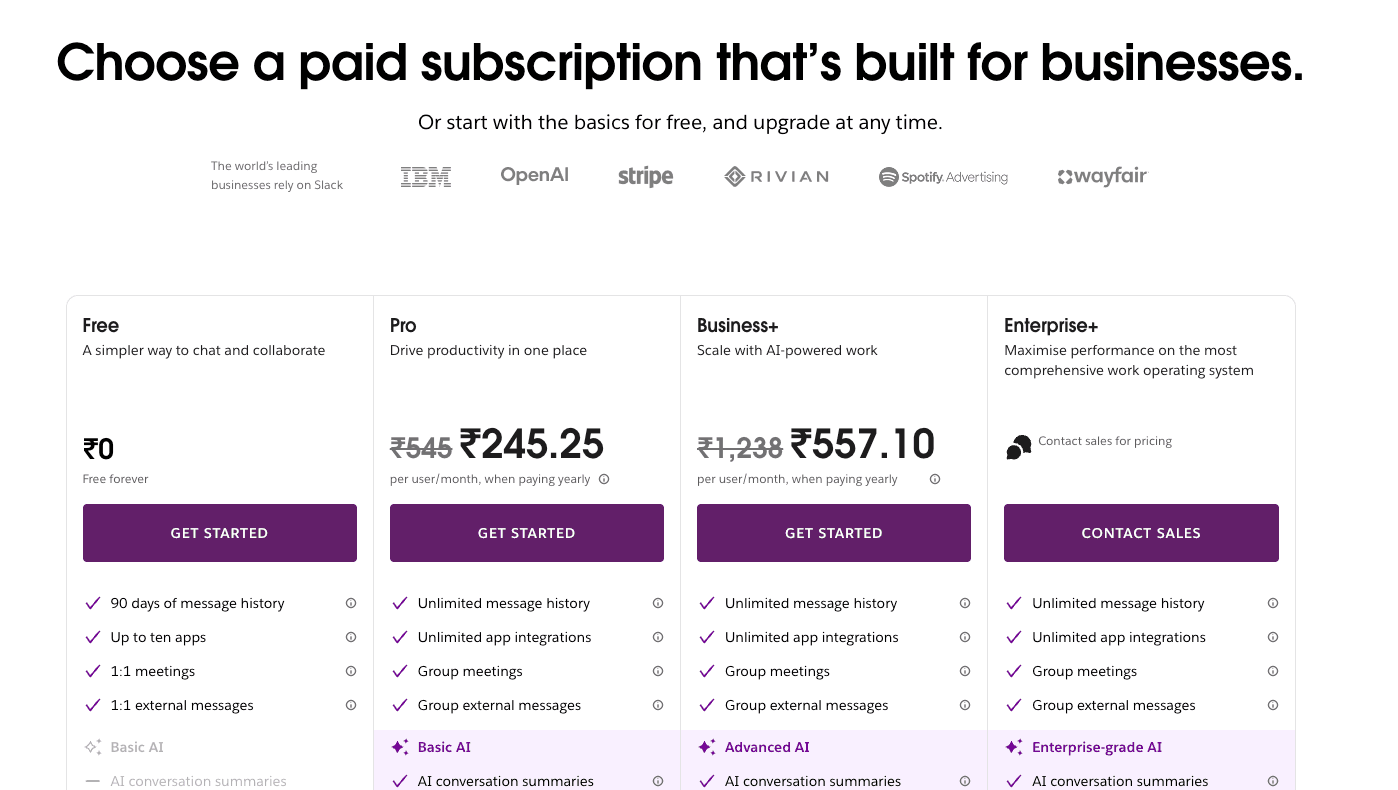
Pricing model: Per-seat tiered with annual discount
Slack wrote the per-seat playbook for B2B subscription pricing. Four plans, each priced per user, with a discount for anyone willing to commit annually.
Free: Limited message history (only the most recent messages stay searchable) and essential features. Enough for a side project or a small group, but every growing team bumps into the history limit within weeks.
Pro ($7.25/user/month on annual billing, or $8.75/user/month): Typical 3-user minimum. Unlocks full message history, unlimited integrations, group video calls, and workflow automations. This is the default plan for a startup or small team. A 10-person team at Pro on annual billing pays $72.50/month.
Business+ ($15/user/month on annual billing, or $18/user/month): Adds SAML SSO, data exports, corporate exports, a 99.99% uptime SLA, and advanced identity management. A 50-person company on Business+ annual pays $750/month.
Enterprise Grid: Custom pricing. Scoped per organization, priced by sales on a yearly contract. Adds unlimited workspaces under one org, compliance controls (HIPAA, FedRAMP), key management, and enterprise support. This is the plan Fortune 500 companies sign.
Slack's structure is not the unusual part. Tiered seats with an annual discount are a standard B2B SaaS shape. What makes Slack famous is the Fair Billing Policy: Slack does not charge you for a user who has not logged in for 14 days.
They automatically credit the next invoice.
That one policy is half the reason Slack earned enterprise trust in the mid-2010s and still defends that today. Every competitor can copy the pricing page. Few copy the fairness rule that sits underneath.
How does this help you?
If you are selling per-seat into teams or an enterprise, the Fair Billing Policy is the cheapest trust signal you can add to your pricing page. You are telling procurement, "We will not charge you for ghost users," before they even think to ask.
That one sentence converts pilot deals into committed contracts, because the buyer trusts they will not get bill-shocked at renewal.
Per-seat pricing is more than a number on a page. The buyer wants to know you will not charge them for ghost users. A small fairness rule, like Slack's 14-day auto-credit, is what separates per-seat pricing that wins enterprise deals from per-seat pricing that loses them.
6. Notion
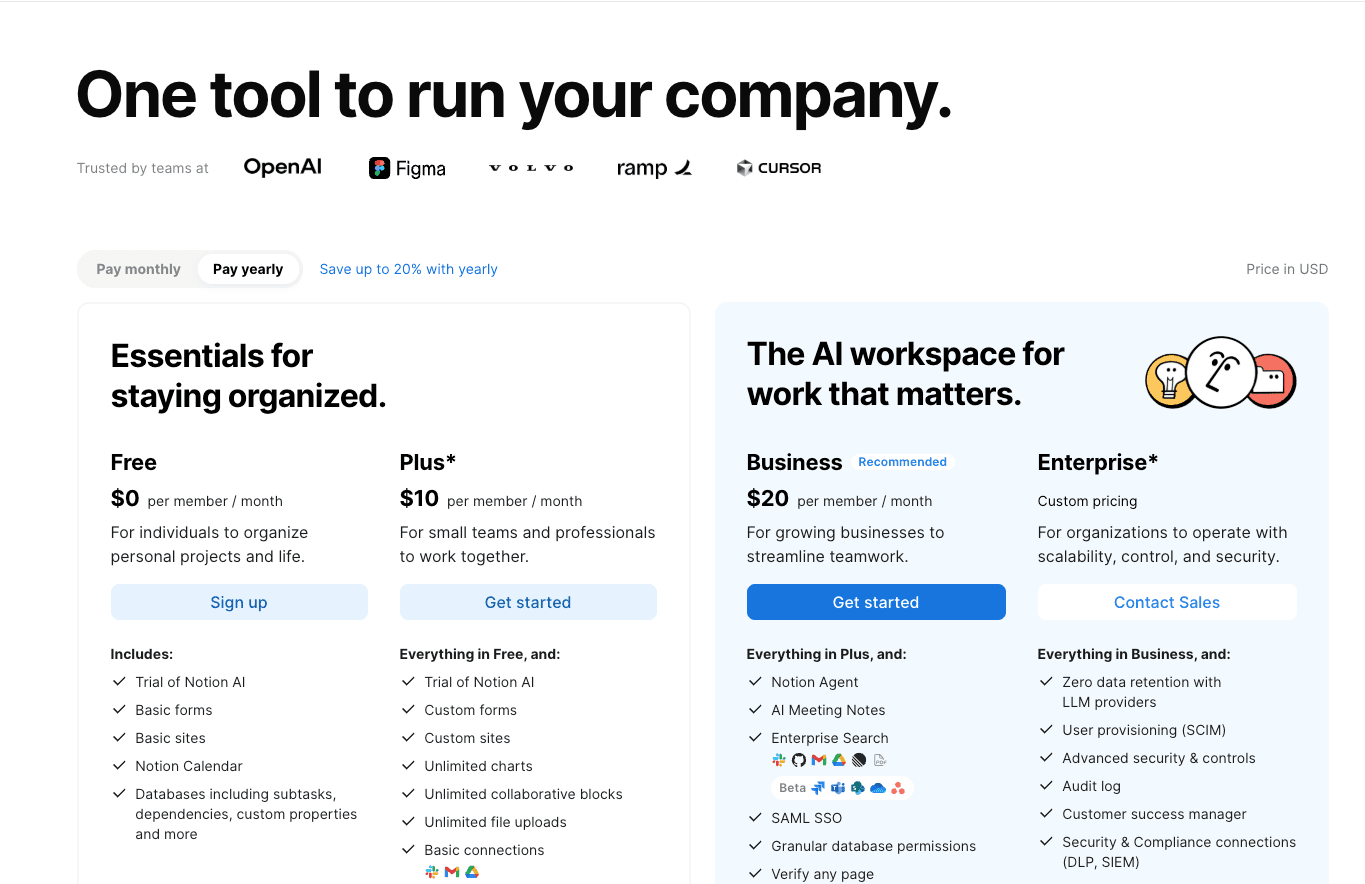
Pricing model: Per-seat tiered plus credit-metered Custom Agents add-on
Notion prices the collaborative product per seat, then layers a credit-based add-on for AI workloads. Four plan tiers plus one usage add-on, all on the same invoice:
Free: Trial access to Notion AI, plus basic forms and databases. Enough to try the product and share a few pages. Individuals and tiny teams sit here for months.
Plus ($10/user/month): The default paid plan. Adds custom forms, unlimited charts, unlimited file uploads, and basic integrations. A small team ready to commit to Notion as its docs-and-wiki platform lands here.
Business ($20/user/month): Unlocks the AI-heavy feature set: Notion Agent (multi-step task completion), AI Meeting Notes, Enterprise Search (in beta), Research Mode, and premium integrations. This is the tier Notion nudges AI power users toward, which became a flashpoint with the community.
Enterprise (Custom pricing): Adds zero-retention AI (prompts are not stored by LLM providers), SCIM user provisioning, audit logs, a dedicated customer success manager, and compliance integrations. Priced on a yearly contract by sales.
Custom Agents add-on: $10 per 1,000 credits, free to try. This is the usage-metered layer that sits on top of whatever seat plan you are on. Every AI task burns credits. Light users barely notice it; power users top up as they scale.
The core product is sold per seat, and AI agent usage is sold on credits. Two billing dimensions, one invoice, and one of the cleanest subscription pricing model examples of hybrid-in-disguise.
When Notion first dropped the standalone $8 AI add-on and pushed AI users into the $20 Business tier, the community response was immediate.
A widely shared post titled "Notion AI is too expensive for users who only need AI functionality" captured the complaint: bundling AI into a full seat forced users to pay for features they did not want.
Notion's response was Custom Agents on a pure credit model. Now, power users pay for what they use, light users skip the add-on entirely, and Notion keeps the margin.
How does this help you?
If you are a SaaS adding AI features right now, you are about to face the exact problem Notion faced. You bundle AI into your seat price, and your light users revolt. You charge seat-plus-usage, you need a meter that actually works in real time.
Notion's answer is the template you can copy. Keep your core product per-seat, put the AI workload on credits, run both on one invoice.
Your light users never touch the credit meter, so their bill stays flat and predictable. Your power users pay for what they actually use, which protects your margin on the expensive workload.
And you skip the community backlash because you are not forcing anyone into a tier they do not want. This is the plan that every collaborative SaaS will copy in 2026; you may as well get there first.
7. Figma
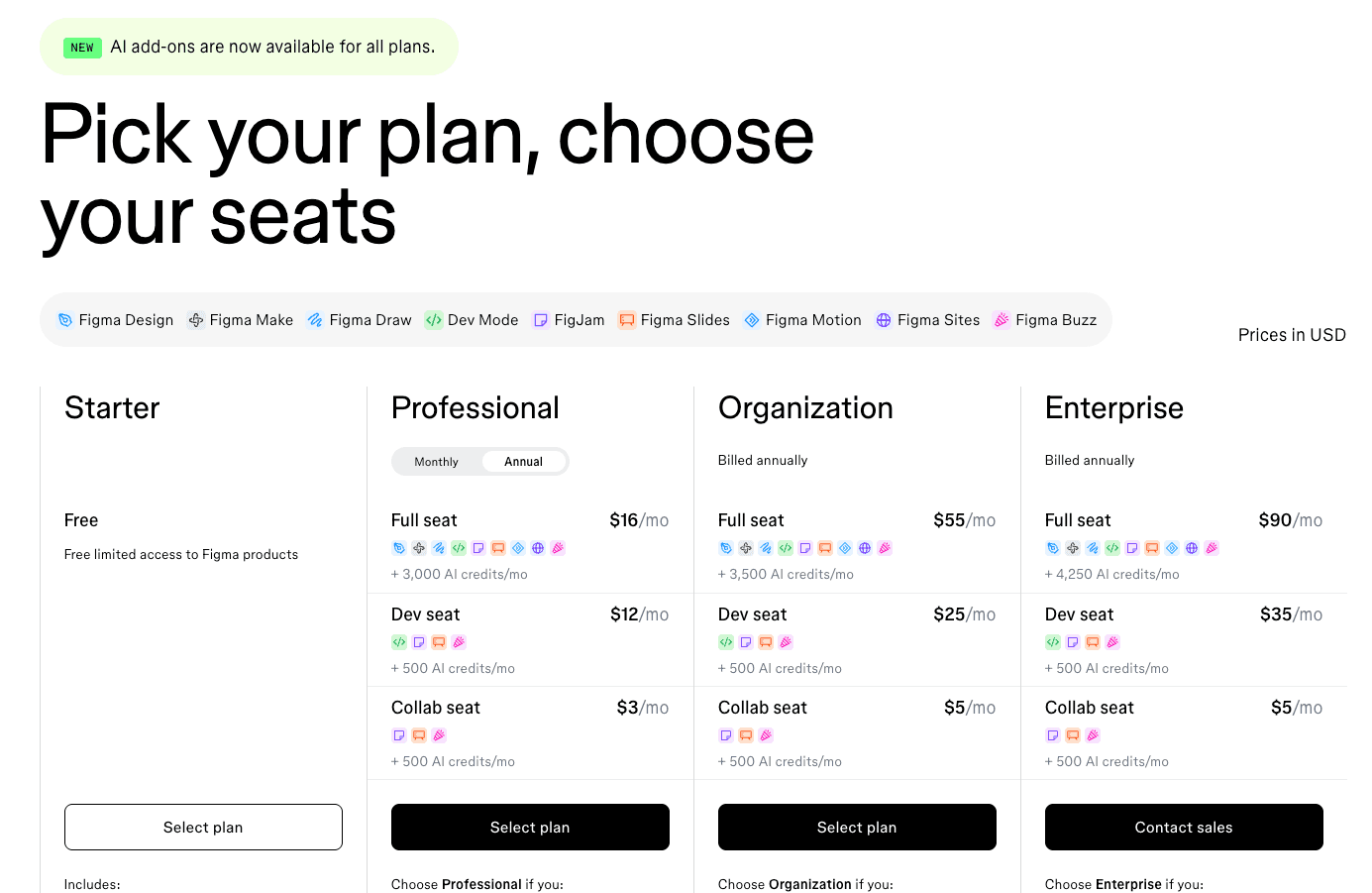
Pricing model: Role-based per-seat with three seat types per plan tier, plus per-seat AI credit allocations
Figma does something most per-seat SaaS does not: it charges different prices for different roles inside the same company. Three seat types (Full, Dev, Collab) across three paid tiers, plus a generous free plan.
Every seat also includes a monthly allotment of AI credits:
Starter (Free): 150 AI credits per day, up to 500 per month, unlimited drafts. Individual designers and students live here. Enough to build portfolios and experiment with Figma AI without opening a wallet.
Professional (monthly or annual billing) prices three seat types:
Full seat: $16/month + 3,000 AI credits/month. For designers doing the actual design work.
Dev seat: $12/month + 500 AI credits/month. For engineers who inspect designs, pull specs, and export assets.
Collab seat: $3/month + 500 AI credits/month. For PMs, leaders, and reviewers who comment and approve.
Organization (annual billing only) bumps the prices and the AI allowance:
Full seat: $55/month + 3,500 AI credits/month.
Dev seat: $25/month + 500 AI credits/month.
Collab seat: $5/month + 500 AI credits/month.
Enterprise (annual billing only) is the top tier:
Full seat: $90/month + 4,250 AI credits/month.
Dev seat: $35/month + 500 AI credits/month.
Collab seat: $5/month + 500 AI credits/month.
Figma is what happens when per-seat pricing grows up. Three seat types at three prices, then multiplied by plan tier, creates a matrix that lets Figma monetize the reality that everyone in a company needs Figma access, but only some should pay full price.
A 20-person product team might have 5 Full seats, 10 Dev seats, and 5 Collab seats, each priced for the work they actually do.
When Figma rolled out Dev Mode seat pricing back in January 2024, community reaction was strong. Users pushed back on the $35/month Dev Mode seat, arguing it felt disproportionate for simply inspecting designs.
Years later, the matrix is still in place, which tells you how Figma read the trade-off between short-term user anger and long-term expansion revenue.
How does this help you
If multiple roles in your customer's company use your product but extract different value from it, Figma shows you how to monetize that spread.
You stop leaving money on the table by pricing the designer the same as the PM, who only comments. You stop losing deals because a flat seat price feels too expensive for the reviewer tier.
Role-based pricing also unlocks a growth lever most founders miss: you can sell to more people at the same company without forcing a plan upgrade.
Take a 50-person company. With role-based seats, they can put all 50 people on Figma: 10 Full, 10 Dev, 30 Collab, because each role is priced for what it actually does. Under flat per-seat pricing, they would buy 5 designer seats and leave the rest out.
If your product has this kind of role spread today, you are sitting on expansion revenue you have not charged for.
8. Vapi
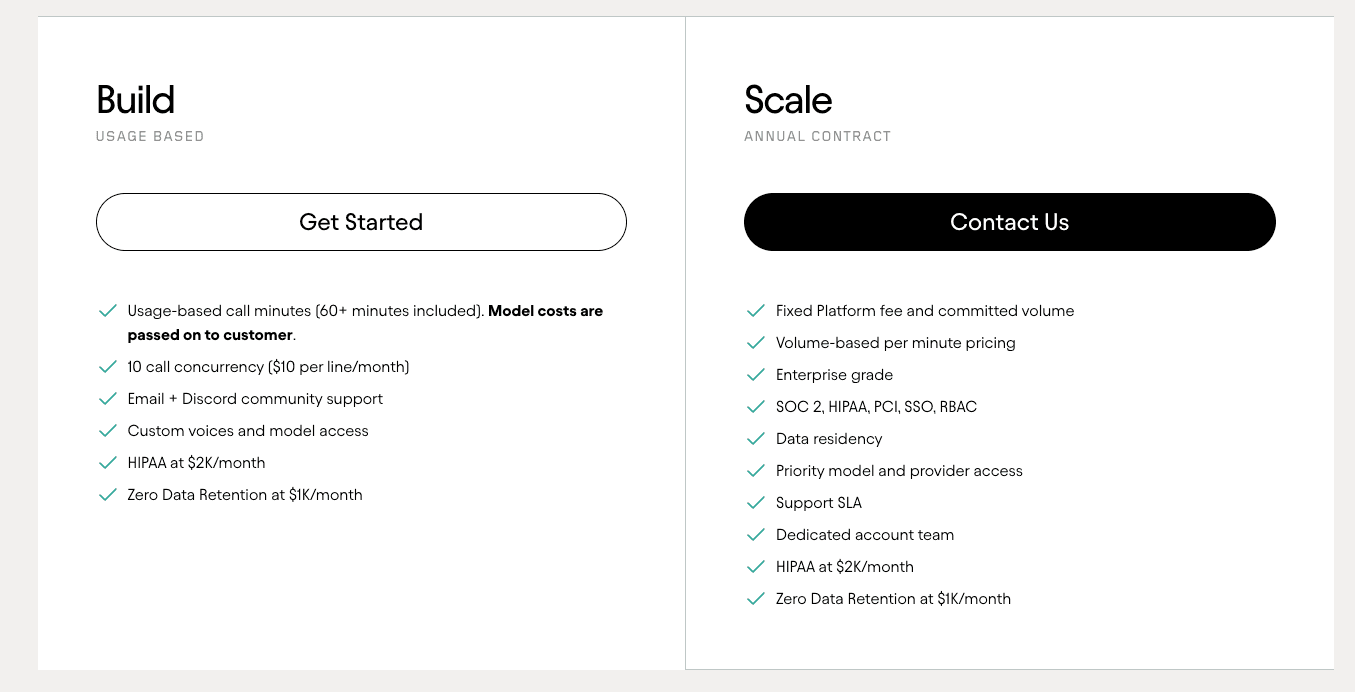
Pricing model: Usage-based per-minute with passthrough on third-party providers, enterprise committed-spend options
Vapi, one of our customers at Flexprice, prices AI voice the honest way: you pay for every minute of call time, and the bill is built from four separate cost components. No seats. No tiers for humans. Value scales one-for-one with usage.
Here is what makes up a Vapi minute:
Platform orchestration (~$0.05 per minute): Vapi's own fee for running the call, handling turn-taking, routing, and the state machine that makes a voice agent work.
LLM passthrough (~$0.02-$0.20 per minute): The cost of whichever language model runs the conversation (GPT, Claude, Gemini, and others). Vapi bills this at cost. Small models sit near the bottom of the range; GPT-4 class reasoning models sit at the top.
Voice/TTS passthrough (~$0.04 per minute on average): The cost of the voice engine that speaks back to the caller (ElevenLabs, PlayHT, and others). Also billed at cost. Premium voices cost more than standard.
Transcription (STT) (roughly $0.01 per minute, varying by provider): The speech-to-text layer that converts the caller's audio into text for the LLM, typically via Deepgram.
Telephony: variable per minute, plus monthly phone number fees. The raw cost of carrying the call over phone lines.
Blended customer cost: typically $0.07-$0.25 per minute, with heavier setups reaching $0.30-$0.33. A customer using a small LLM and a standard voice lands near the low end. One using GPT-4 class and a premium voice lands near the high end.
Enterprise: Custom volume discounts and committed-use contracts. Larger customers negotiate bulk minute pricing, committed monthly spend, and dedicated support.
The page looks simple ("$0.05 per minute"). Underneath, Vapi is tracking four cost dimensions in real time so the customer sees one blended per-minute rate on their invoice.
That transparency is why Vapi wins deals: the buyer knows exactly what each component of a call costs and how to optimize.
How does this help you?
If you are building on top of third-party AI providers (LLMs, voice engines, telephony, image models), Vapi's passthrough model solves the margin and the trust problem at once. You show your customer the real cost of each component. Your fee is your orchestration value, not a hidden markup on someone else's API.
The buyer trusts the breakdown because they can verify it against the provider's own pricing page. Provider prices change a few times a year. When they do, you pass the new price straight through to the customer. You don't eat the cost yourself, and you don't raise your list price to cover it. Your pricing stays honest, and your margin stays protected.
If you are pricing an AI product today and cannot decide whether to mark up passthrough costs or pass them through cleanly, Vapi shows you the answer. The transparent path is also the easier one to defend.
9. Simplismart
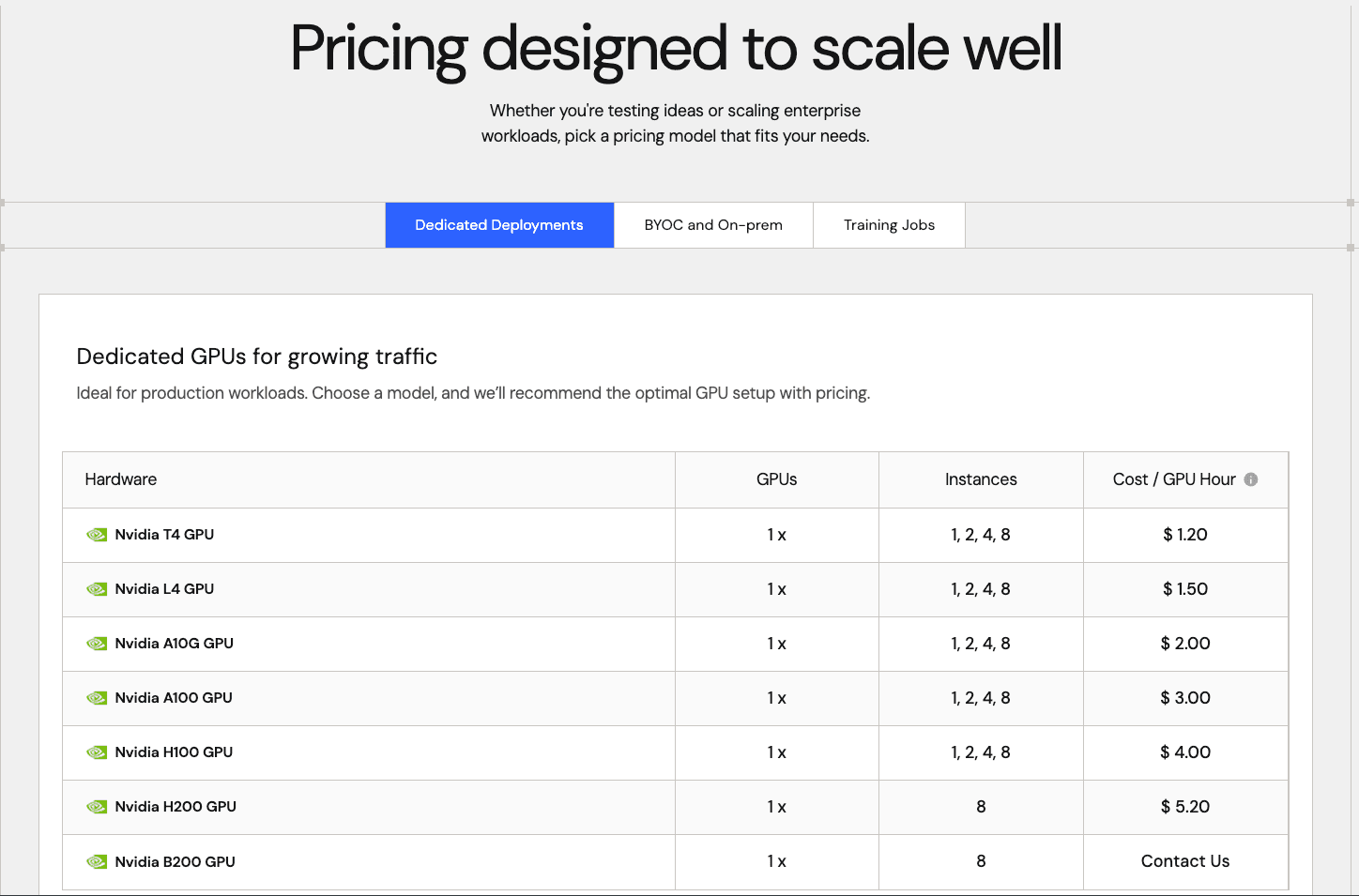
Pricing model: Hybrid platform access plus per-resource usage meters plus entitlements
Simplismart, another Flexprice customer, operates on a hybrid pricing model. Customers pay for platform access, and four distinct usage meters run underneath. One subscription, multiple value drivers, one invoice.
Here is how each meter is priced:
Model APIs (LLM/SLM): $0.06 to $3.90 per 1M tokens. The per-token rate depends on the model. Smaller, cheaper models sit at the bottom (Llama 3.1 8B at $0.13 per 1M tokens). Frontier reasoning models sit at the top (DeepSeek-R1 at $3.90 per 1M tokens). Customers pay only for the tokens they actually use.
Diffusion/image generation: $0.03 to $0.28 per 1024x1024 image. Priced per image generated. Lightweight models like Flux Dev run as low as $0.03 per image. Heavier models like SDXL run up to $0.28. A customer generating 10,000 marketing images on Flux Dev pays $300; the same volume on SDXL is $2,800.
Speech-to-text: $0.0018 to $0.003 per audio minute. Whisper v3 Turbo is the cheapest at $0.0018 per minute. Whisper Large v3 runs $0.003 per minute for higher-accuracy transcription. At scale, 100,000 audio minutes on Turbo costs $180.
Dedicated GPU deployments (hourly rates):
T4: $1.20/hour. Entry-level inference GPU.
L4: $1.50/hour. Newer mid-tier GPU, better throughput than T4.
A10G: $2.00/hour. Mid-range inference workhorse.
A100: $3.00/hour. High-end training and inference GPU.
H100: $4.00/hour. Frontier-class GPU for large models.
H200: $5.20/hour. Newer generation, for heavier workloads.
B200: Contact sales. Simplismart's top-end GPU, priced on request.
Enterprise: Custom pricing for large-scale GPU reservations at committed rates below on-demand pricing. Enterprises book capacity in advance and pay less per hour for the certainty.
The reason Simplismart splits its pricing is simple. Text work is priced per token. Image work is priced per image. Audio work is priced per minute. A dedicated GPU is priced per hour. Forcing all four into one price, or one flat subscription, either leaves money on the table or overcharges half your customers.
How does this help you?
If you sell per-seat or flat-rate pricing today and you are adding AI, GPU, or heavy usage features, Simplismart shows you where this ends up.
You keep a baseline platform fee that every customer pays. You charge for each type of work separately, because each one has different costs on your end. You put it all on one invoice so your customer sees one total, not four.
If you think you are running "just" per-seat today, but you have already added one usage-based feature or an AI add-on, you are already running a hybrid model. The real question is whether you design it on purpose now or fix it later when things start breaking.
See how Flexprice helped Simplismart. Full story on how they moved to hybrid pricing in days, cut pricing changes from days to minutes, and saved over $145K a year. Read the case study.
Why do subscription pricing models change as a company grows?
Subscription pricing models change because one model stops capturing every value driver once a company scales, and most of the brands in this post started on a different model than the one they run now. That's the part every founder skips, and it's the part we watch founders get burned by the most.
Slack launched with simple per-seat pricing. Today, it offers tiered seats, fair-billing credits, annual discounts, and a separate enterprise Grid contract.
Dropbox started with one consumer plan. Today it runs personal, family, business, and enterprise. Four subscription pricing shapes on one back end, all feeding the same subscription revenue engine.
Notion started per-seat only. Adding AI forced them into per-seat plus usage metering. The AI add-on then got folded into a higher tier in May 2025, which is itself a pricing model change, not a marketing one.
The pattern every founder needs to see is that every successful SaaS becomes hybrid. Not because hybrid pricing is trendy. Because growth forces you to price different value drivers differently. Your seats don't capture your AI cost. Your AI cost doesn't capture the collaborative value of the core product. So you layer.
Here's the warning we give every customer who comes to us mid-migration. If your billing stack can only run the subscription pricing model you picked on day one, you hit a wall the day you try to upgrade.
Pricing isn't a decision. It's a system you'll change four times before you hit $10M ARR, and we've watched that number hold up across almost every customer we've onboarded.
How do you pick a subscription pricing model for your situation?
You don't need a 40-page framework. You need three questions, and each one maps to a brand on this list.
1. What's your primary value driver today?
If you look like Dropbox, it's storage.
If you look like Slack, it's team seats.
If you look like Vapi, it's minutes.
If you sell outcomes, you're already in the hybrid bucket.
Pick the brand you most resemble and start with that subscription pricing model.
2. How will the value compound for your customer in 18 months?
Notion started per-seat. Adding AI pushed them into per-seat plus usage.
ElevenLabs started with flat credit tiers. Now they run tier-specific overage rates.
Your subscription pricing will shift the same way. So pick a model that fits today, but plan your billing stack for the model you'll need next.
Each model also carries a different revenue-predictability profile worth knowing before you commit. Per-seat is the most forecastable but caps out at headcount. Usage-based expands faster but swings more from month to month.
Credit-based smooths revenue because customers pay before they consume. Hybrid captures the most total value but is the hardest to forecast cleanly, since you're modeling several curves at once instead of one. If revenue predictability matters as much as growth to you right now, that alone can tip which model you start with. We break this down stage by stage in what SaaS billing looks like at every MRR level.
3. Can your billing stack run the model you want and the model you'll need next?
Most teams answer "yes" because the pricing page is easy. Then they discover that running Simplismart's hybrid pricing model (platform fee plus usage meter plus entitlements) on a Stripe-only stack is 3 to 6 months of engineering.
If your stack was built for one model, you ship one or the other, not both.
Moving from Slack's per-seat to Simplismart's hybrid costs most teams a quarter or more of their engineering work on billing instead of product building.
Pick the subscription pricing model that fits you today. Make sure your stack can run the model.
How does Flexprice run any of these subscription pricing models?
Here's what we keep hearing from customers. You don't need to rebuild your whole subscription billing stack when you change your pricing. You just change a few pieces underneath.
That's the whole idea. Every brand in this post looks different on the pricing page, but underneath, they all come down to the same six things Flexprice gives you out of the box:
Plans and prices: Flat-rate, tiered, per-seat, usage-based, hybrid. All live on one object. When sales cuts a custom deal, you add a per-customer override and move on.
Usage Metering: Real-time tracking for API calls, minutes, tokens, active users, visits, or anything else you count.
Features and entitlements: Feature toggles, usage limits, plan-specific gates. This is how you turn AI on for Business and off for Plus without writing new code.
Credits and Wallets: Prepaid balances, auto top-ups, expirations, promo credits. The engine behind "buy $500 in credits" and enterprise prepaid commitments.
Subscription schedules: Phased or ramped pricing over time. The pilot-to-scale shape enterprise contracts need, with no customer migration.
Pricing Experiments: Test a new price on a subset of customers, migrate everyone else with proration handled automatically, and roll it back instantly if the metrics drop. This is how Notion or Slack could try a new tier without betting the whole customer base on it.
Mix those six, and you can build every shape on this list. Two quick examples to make it real.
Want Slack's fair-billing per-seat? Price on seats. Meter on active users. Credit back any seat that has been inactive for 14 or more days. Three pieces, one subscription.
You came here for 9 subscription pricing model examples. You leave with a stack that runs all of them without a rewrite.
Pick your favorite brand from this list and tell us which one. We'll show you how Flexprice runs its subscription pricing in 15 minutes.
Wrapping up
Nine brands and multiple subscription pricing models. One pattern we see repeat in nearly every customer conversation we have.
Flat-rate looks simple until you count the multi-seat cancel paths.
Tiered looks fair until the auto-upgrade email lands in a customer's inbox. Per-seat looks clean until you need role-based entitlements.
Usage-based pricing looks modern until the first invoice dispute lands in support. Credit-based looks buyer-friendly until you're tracking balances, rollovers, and expirations across 500 customers. Hybrid is where every mature SaaS eventually lands, because different value drivers deserve different metrics.
The common thread across all 10 subscription pricing model examples: the pricing page is the easy part. The billing stack is where the work lives.
Pick the model that fits your subscription business today. Build, or buy, a billing stack that runs the model you'll need in 18 months. Every brand in this post learned that the hard way. You don't have to.
If you're stuck on which subscription pricing model to copy, pick the brand on this list that looks most like you, model after it for six months, then re-read this post. You'll see your next move.
What are the main subscription pricing models used by SaaS brands in 2026?
What is the difference between usage-based pricing and credit-based pricing?
Why do SaaS companies eventually switch to hybrid pricing models?
How does Slack's per-seat pricing work, and why do enterprises trust it?
How do I choose the right subscription pricing model for my SaaS product?