
Aanchal Parmar
Product Marketing Manager, Flexprice
The 6 stages of how an enterprise billing system works
Most people say "billing" like it's one thing. Inside it there are six separate stages, and knowing the name of each is what lets you read vendor docs, sit through a demo, and ask a sharp question without feeling lost. Every serious enterprise billing software product runs some version of this same sequence, for every customer, every cycle.
I'll walk through it as one deal, start to finish: an AI inference platform closing a contract with a bank, call it Acme Bank, worth $50K a month plus 10M included tokens, overage at $0.004 per 1K tokens with a 20% discount after the commit hits, a quarterly true-up, and Net 60 terms.
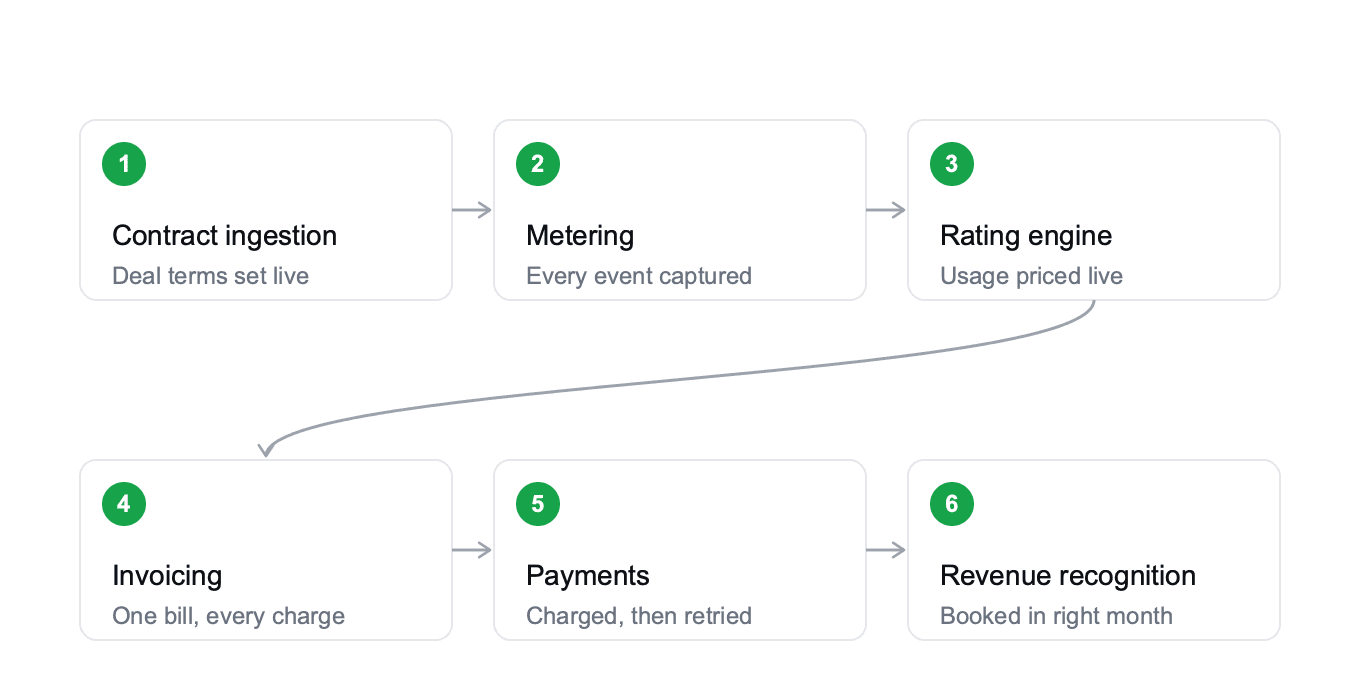
1. Contract and usage ingestion
This is where deal terms and entitlements enter the system. When your account executive marks a deal closed-won in Salesforce, the contract fields, price, commitment, terms, start date, currency, entity, flow straight into the billing system through an API or a built-in connector, no copy-pasting.
The system also writes down entitlements, the "what's included" side of the contract translated into machine-readable rules: if the deal says 10M tokens a month, that number is live from minute one.
Day 1 for Acme Bank, the deal closes, the system provisions 10M tokens included and configures the $0.004-per-1K overage tier, and queues the $50K platform fee for the end of the cycle.
2. Metering
This is the pipeline that captures every billable API call, token, compute minute, and storage write from your product in real time, sitting between your application and your rating engine.
Good metering is lossless, idempotent, and fast. Idempotent means if the same event arrives twice, the system counts it once, which matters because networks retry and SDKs retry, and without idempotency every retry becomes a double charge on your customer's invoice.
Day 15 for Acme: their engineers are halfway through the token allowance. The product has emitted roughly 5M token events into the metering layer.
3. The rating engine
This is where pricing rules meet raw usage. It looks at every event, compares it against entitlements and pricing tiers, and calculates what it costs, the brain of any billing stack.
Day 15, the rating engine has counted Acme's 5M tokens and added zero dollars to the invoice, they're still inside the commit. Day 23, traffic spikes during a customer launch and they cross the 10M threshold.
The rating engine checks entitlements, sees the commit is exhausted, and applies the overage tier: $0.004 per 1K tokens with a 20% discount. From that moment, every token is priced and accrued in real time.
4. Invoicing
This is the step that consolidates rated usage, subscription fees, credits, and adjustments into a single invoice, handling taxes, PO numbers, and delivery formatting.
For an enterprise customer, that usually means matching a PO number and routing through Coupa or SAP Ariba on Net 30 or Net 60 terms.
Day 30, Acme's billing cycle closes. The system consolidates the $50K platform fee plus the overage, they burned 3M tokens past commit, so 3,000 x $0.004 x 0.8 = $9,600, adds sales tax, attaches the PO number, and sends it to Acme's AP inbox with Net 60 terms.
5. Payments and dunning
This is where the money actually gets collected: the system charges the card, pulls ACH, or matches a wire to the invoice.
If a payment fails, it retries on a schedule, for example Day 3, Day 7, Day 14, then hands it to a human.
The retry part has a name: dunning, and it's what keeps your Days Sales Outstanding, DSO, the average number of days it takes to collect payment after you've invoiced, from creeping up.
A slow dunning process doesn't just delay cash, it stretches DSO, and a stretched DSO is one of the first numbers your CFO notices.
Acme is on Net 60 terms, so this invoice isn't due for two more months. Dunning only kicks in if that date passes without payment.
6. Revenue recognition and ERP sync
This is the part that decides when revenue actually counts, not when the cash lands.
Take a $120K annual deal signed in January: you don't get to book the full $120K that month, you book $10K each month as you deliver the service, and the rest sits in deferred revenue until it's earned.
The revrec engine spreads recognized revenue across service months and posts journal entries into NetSuite, Sage Intacct, or SAP, the part your auditors care about most, because it's where your books actually get built.
Day 90 for Acme: quarter-end. The system reviews three months of actuals against commit and generates a clean true-up statement.
That same night, revenue recognition runs, spreading the platform fees across each service month and booking the overage revenue in the month it was earned. Journal entries post to NetSuite before the controller's morning coffee.
That's the full loop, for one customer, one quarter: a deal closes, tokens get metered, the rating engine prices them, an invoice goes out, payment comes in, and revenue lands in the right month on the P&L.
All of it also feeds the numbers your CFO actually wants, MRR, ARR, DSO, revenue by entity, in one dashboard instead of three spreadsheets and a Looker query at midnight. Every enterprise billing system runs some version of this same six-stage sequence, for every customer, every cycle.
What enterprise billing software connects to
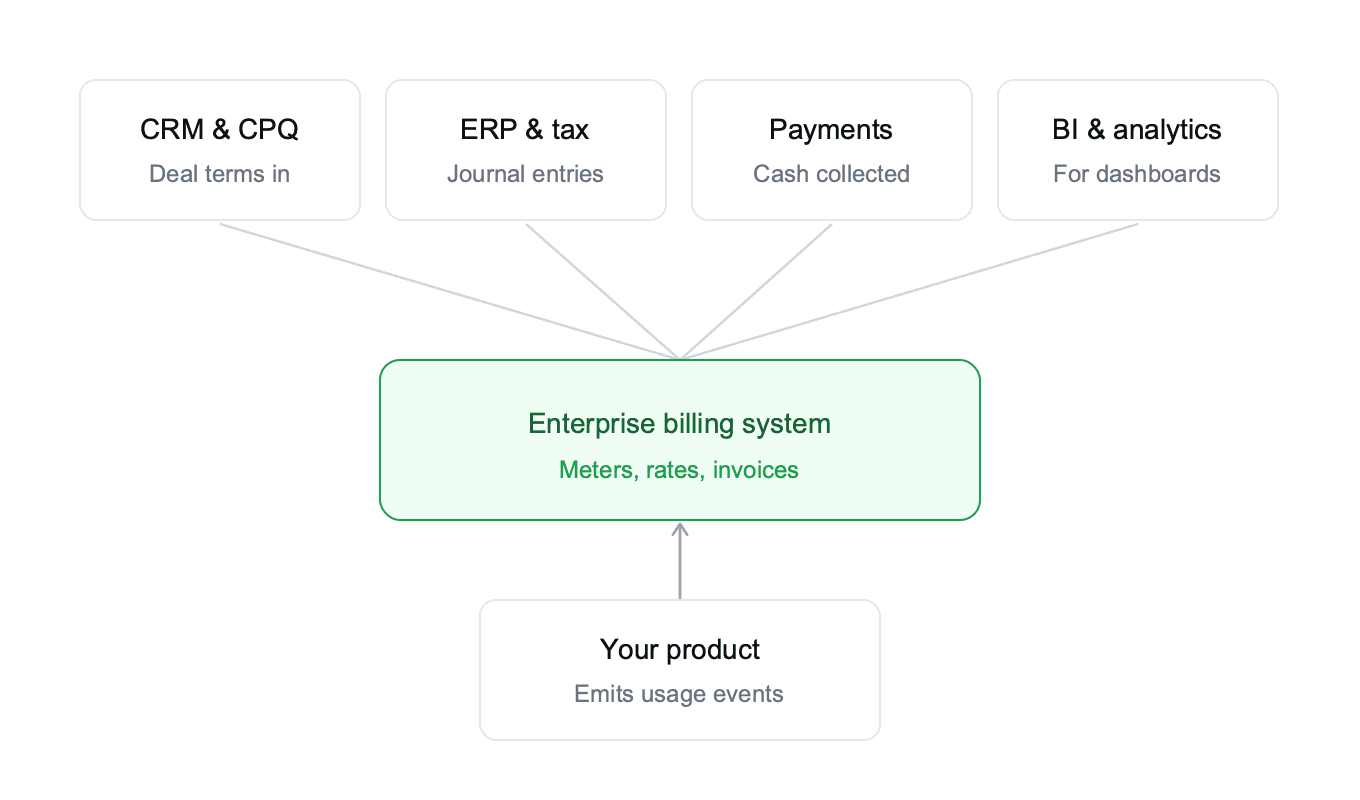
The billing system is the hub, but it's not standalone. Here's the stack around it.
CRM: Salesforce and HubSpot, mostly. Deal terms flow in from here.
CPQ: Salesforce Revenue Cloud, DealHub, or a homegrown quote builder. Handles the quote-to-contract side before anything hits billing.
ERP and accounting: NetSuite, Sage Intacct, SAP, QuickBooks. This is where journal entries land and where your CFO closes the books.
Tax engines: Avalara and Anrok calculate sales tax, VAT, and GST on every invoice based on customer location and product category.
Payment processors: Stripe, Adyen, Braintree, and ACH providers like GoCardless handle collection.
Your product: usage events flow in from your application, usually through Kafka, Segment, or a direct SDK. Sometimes they come in batches from Snowflake.
BI and analytics: Snowflake, Looker, Tableau. Finance pulls data out for reporting, forecasting, and board decks.
Picture a stack with your product at the bottom emitting events, the enterprise billing software in the middle doing the work, and the CRM, ERP, tax, and BI tools hanging off the sides like spokes. A healthy setup makes the rest of the stack look coordinated instead of chaotic.
Who uses enterprise billing software inside a company
One reason this category confuses people is that it's not owned by a single team. Here's who touches it and why.
Finance treats the billing system as the source of truth for revenue. They close books from it, they answer audit questions from it, and they produce board reports from it. They usually own the vendor relationship and the budget.
RevOps runs pricing experiments, tracks quote-to-cash health, and monitors DSO and collections. They care about how fast contracts flow through and where deals stall in handoff.
Engineering owns the metering integration and the APIs that send events. They also care about uptime, event ingestion scale, and whether the system rate-limits their bursts during a launch.
Product owns pricing and packaging. When the team wants to launch a new pricing plan, a credit pack, or a metered tier, product pulls the trigger in the billing system. They also get blamed when a launch breaks revenue reporting.
Sales closes the deals, and enterprise billing software lets sales build custom deal structures with ramps, commits, discounts, and co-terms without filing an engineering ticket. A good saas billing setup keeps sales out of spreadsheets and inside the CRM.
If you're reading this, you're probably one of those five. The buying decision usually sits with finance or the CFO, but the daily operators are a mix of RevOps, product, and engineering.
Enterprise billing vs. standard billing: a clear comparison
Here's the quick table that answers "what makes this 'enterprise'?"
Axis | Standard billing (Stripe, Chargebee) | Enterprise billing software
|
|---|---|---|
Pricing models | Flat subscriptions, simple tiered plans, basic usage metering. Works well for self-serve checkout. | Custom pricing, hybrid models (platform fee + commit + overage), ramps, minimum commits, quarterly true-ups, co-termed deals. |
Scale | Handles thousands of events per day; nightly batch jobs are acceptable. | Ingests millions of events per second in real time; built for AI inference loads and high-volume APIs. |
Contracts | Templated terms, self-serve sign-up, card-first checkout. | Custom signed contracts, PO-based invoicing, Net 30/60 terms, often routed through procurement systems like Coupa or SAP Ariba. |
Compliance | Basic tax handling and simple audit trails. | Advanced compliance: ASC 606 / IFRS 15 revenue recognition, SOX controls, SOC 2, multi-entity and multi-currency support. |
Integrations | Payment processors and basic accounting (e.g., QuickBooks). | Full stack integrations: CRM (Salesforce, HubSpot), CPQ (DealHub), ERP (NetSuite, Sage Intacct, SAP), tax (Avalara, Anrok), BI (Snowflake, Looker, Tableau), plus product data. |
Customization | Dashboard-driven, limited to UI capabilities. | API-first, highly configurable rules and business logic that product or RevOps can modify without engineering dependency. |
Typical use case | Self-serve SaaS and DTC subscriptions. | Enterprise SaaS, AI inference platforms, developer tools, infrastructure, fintech. |
If your deals look like the left column, you don't need a full enterprise billing system yet. A lightweight saas billing software will cover you. If they look like the right column, you're already in this category, whether or not you've bought a dedicated tool. You're just absorbing the cost in spreadsheets and engineering hours.
Signals you've outgrown your current billing setup
You can usually tell when a startup has crossed the threshold. Here are the signals that keep showing up when I talk to finance and RevOps teams.
Your finance close takes more than 10 days because someone spends a week reconciling billing data against product usage.
Sales can't quote a custom deal without filing an engineering ticket or exporting to a spreadsheet.
You have more than three billing spreadsheets floating around your month-end close.
An auditor or a new controller finds revenue leakage (unbilled usage, missed overages, wrong proration) during a routine review.
Product can't launch a new pricing model without a four-week engineering sprint.
Your CFO asks, "What's our ARR?" and gets three different numbers from three different tools.
You've already Googled how an enterprise billing system works three times this quarter, trying to understand why your numbers don't tie.
You have customers on blended plans (platform fee plus usage) that nobody at the company can model confidently from memory.
You've started writing apology emails to customers who got double-billed or under-billed. That's the one most founders miss, and it's usually the sign that your current setup has quietly outgrown you.
If you hit any two of these, you're probably past the point where Stripe plus scripts is enough. Hit four, and you're actively bleeding time, team sanity, and revenue. That's the moment real billing infrastructure stops being a nice-to-have and starts being an actual investment.
How to think about enterprise billing platforms when you're ready to evaluate
Eventually you'll get to the vendor-comparison stage, and when you do, don't get pulled into feature checklists, that's how teams end up buying the wrong thing. Focus on what actually moves the bill and your team's time.
Pricing model flexibility: Can you configure a hybrid plan (platform fee + commit + overage) without writing custom code? Can you change it in a week when the product wants to experiment with new packaging? This is exactly what a Pricing Experiments feature is built for: test a hypothesis on a subset of customers, roll back if the metrics drop, without a single deploy.
Event volume capacity: Can the metering layer handle your peak load without dropping events? Ask for their p99 latency numbers and their max events per second per tenant, in writing.
Multi-entity and multi-currency: If you sell through a US entity and an EU entity, can the system book revenue correctly per entity and consolidate at the parent?
Native integrations vs middleware: Do they integrate directly with Salesforce and NetSuite, or do you need a Workato middleware layer and a dedicated integrations engineer?
Open vs closed: Can you self-host if compliance requires it? Is the data exportable? Is there a full audit trail you can show an auditor without a week of prep?
Cost model: Flat fee, per-event pricing, or percent of revenue? The percent of revenue sounds fine at $2M ARR. It bites hard at $50M when you're paying a vendor seven figures for an infrastructure layer.
If you still feel fuzzy on how an enterprise billing system works at the evaluation stage, drag a vendor through a worked example like the Acme Bank one above. If they can't walk you through the data flow stage by stage, they're not the right fit for your search.
Where Flexprice fits
Everything above is a real, working system, not just theory. It's Flexprice, and it's the reference implementation I know best because I helped build it. Every stage you just read maps to something you can go look at right now, not a slide deck.
Here's how it maps to what you just read:
Usage Metering (stage 2 above). Flexprice ingests events in real time with low-latency tracking for custom metrics like API calls, compute time, and tokens. It's built to handle high-volume peak loads, which is why AI inference teams reach for it instead of patching Stripe with a queue.
Entitlements and feature gating (part of stage 1). Limits and access control are enforced inside the system, so your engineers don't write custom code every time the product wants to lock a feature behind a plan or cap a usage tier.
Pricing Models (stage 3, the rating engine). Seat-based, usage-based, credit-based, and hybrid pricing all work out of the box, with per-customer overrides and no engineering sprint required. You can even price by time of day on one line item, a reserved rate from 9am to 5pm UTC and a different one overnight, the same commitment-and-overage mechanic behind Acme Bank's contract, applied down to the hour.
Ramped contracts and contract versioning (stage 1, extended). Commitments step up on a schedule as a customer moves from pilot to full scale, and every pricing change keeps a tracked history, so nobody argues about what the terms were six months ago.
Credits and Wallets (feeds stage 4, invoicing). Programmatic credit grants with expiration rules and auto top-ups. Useful if you're running an AI or agentic company where customers buy token packs or prepaid credits, and you need to track burn-down in real time.
Billing and Invoicing (stage 4). Automated invoice generation with full customer visibility, so your finance team stops reconciling and starts closing books on time.
A few architecture notes worth knowing. Flexprice is API-first, with SDKs in JavaScript, Python, and Go, so your engineers integrate it without waiting on vendor consultants. There's also an MCP server, connecting Cursor, Claude Code, VS Code, Gemini, or Windsurf directly to billing, so every API operation is a tool your AI assistant can call.
You can self-host it on your own infrastructure, no vendor lock-in, a full audit trail for any SOC 2 reviewer. Because it's open-source, the data model is something you can inspect, extend, or walk away from if your business changes shape, no acquisition can take that away from you, which is more than I can say for a couple of the platforms named earlier.
If your SaaS billing runs on Stripe plus scripts today and the legacy enterprise billing software options don't fit your pricing shape, take a look at the docs or book a demo. The sooner the plumbing is right, the less time you spend reconciling spreadsheets at 11 PM on the last day of the quarter.
Wrapping up
Enterprise billing software is the specialized layer that sits between your CRM and your general ledger. It turns contracts into entitlements, meters usage, prices every event, sends invoices, collects payment, and books revenue in the right period.
Six stages, one clean data flow, and every serious platform on the market is built around it.
If you're a founder, your job is to know when you've outgrown Stripe plus scripts. If you're in finance, your job is to make the billing system the source of truth for revenue instead of reconciling it every month.
If you're in product or engineering, your job is to stop writing custom code every time pricing changes.
The best moment to fix the plumbing is before your month-end close, which takes two weeks, not after.
Pick a tool that was built for your pricing shape, run a worked example through it, and ask the vendor the six-stage question on the first call. If they can draw the flow clearly, you're talking to the right team.
Now you know how it actually works.
What's the difference between enterprise billing software and tools like Stripe or Chargebee?
When should an AI or SaaS company move from Stripe to enterprise billing software?
How does enterprise billing software handle usage-based pricing at AI scale?
Does enterprise billing software handle ASC 606 revenue recognition automatically?
Can enterprise billing software integrate with Salesforce, NetSuite, and my existing stack?