
Koshima Satija
Co-founder & COO, Flexprice

Every growing Voice AI company eventually changes its pricing. You did the same by starting with a flat per-minute rate and realized you're leaving money on the table.
The pricing change itself gets all the attention: Blog posts, announcements, and pricing pages get redesigned.
But there's a problem that almost nobody discusses publicly: what happens to your billing system the moment your new pricing goes live?
Changing your pricing model is a growth event. It means your business has matured enough that the original model no longer fits. But from a billing infrastructure point of view, it's one of the hardest transitions that you'll ever run because you're not just changing numbers on a page. You're changing the logic that touches every customer, every invoice, and every revenue line.
This post will help you walk through the five billing problems that every pricing change creates, with the help of authentic examples from the Voice AI market.
5 billing problems caused by pricing changes that you don’t account for
What looks like a simple change on the surface ends up creating a set of operational problems most teams don’t see coming. Here are five billing problems that show up the moment you change pricing:
Grandfathering who stays on old pricing, and for how long?
When Bland AI moved from a flat $0.09 per minute to a tiered pricing model, they faced the first question every company faces: What do you do with existing customers?
Now you have three options, and each one creates different billing complexity:
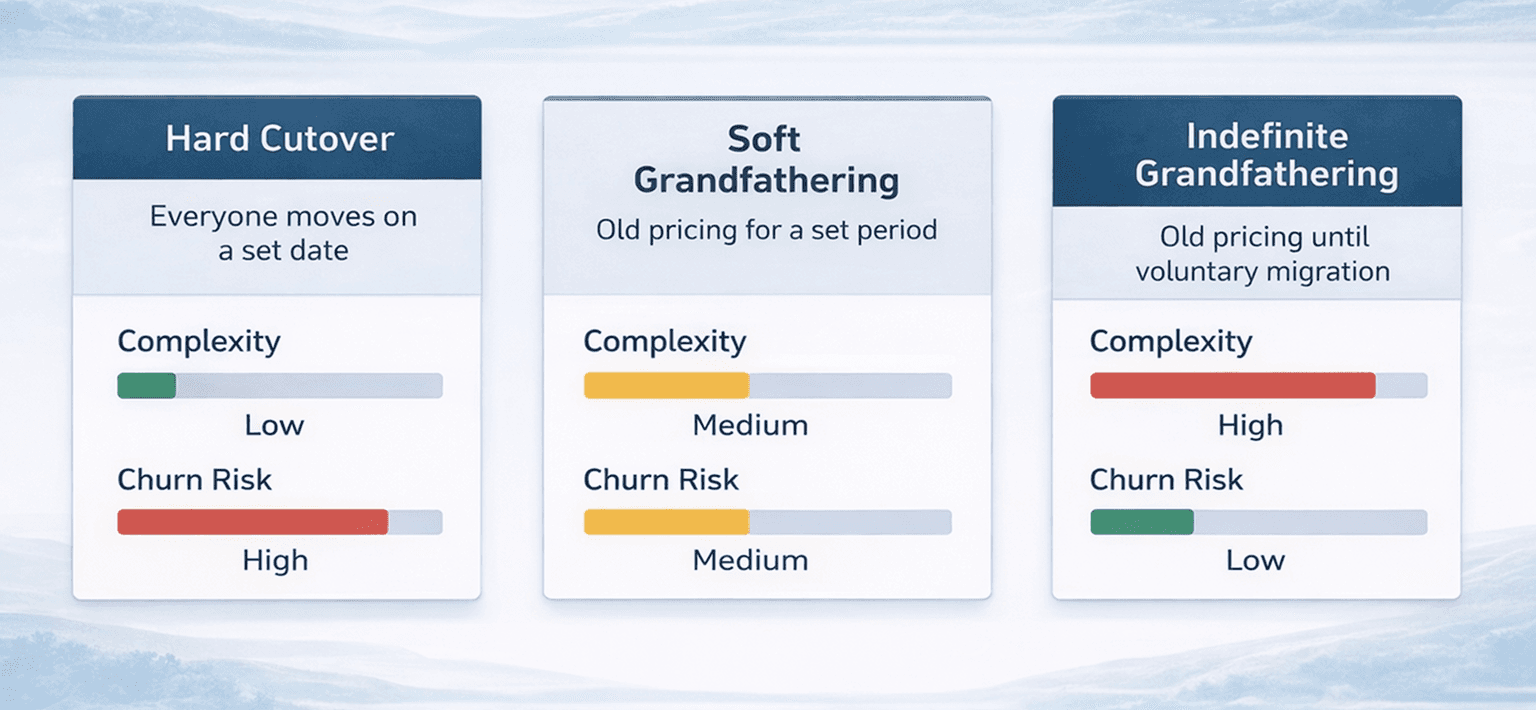
Hard cutover
Everyone moves to the new pricing on a specific date, you shut down the old plan, and switch everyone over. It’s the simplest to execute, but also the riskiest. Customers who signed up because of your old pricing may churn.
Soft grandfathering
Existing customers stay on old pricing for a set period, for example, around 90 days, one renewal cycle, or the end of the annual contract. Your billing system now needs to run two pricing models simultaneously: the old one for grandfathered customers and the new one for everyone else.
Indefinite grandfathering
Existing customers keep their rate until they voluntarily migrate. This is the friendliest approach, but it means your billing system must maintain legacy pricing logic indefinitely. Two years later, your team is still debugging edge cases in a pricing model you stopped selling.
Most Voice AI companies choose soft grandfathering, which means your billing system needs to track a per-customer pricing version and a grandfathering expiry date. When the expiry hits, the system needs to automatically migrate that customer to the new model, send appropriate notifications, and handle any pro-ration.
If you change pricing three times over two years, which is common in early-stage Voice AI, you might have customers on three different pricing versions simultaneously. Your billing system needs to support all of them.
Mid-cycle transitions
Pricing changes rarely align perfectly with billing cycles. If your billing runs monthly and you announce new pricing on the 15th, you have a mid-cycle problem.
For the first half of the month, the customer was on old pricing. For the second half, they're on new pricing. Your invoice needs to show both, with the correct pro-ration for each period.
This gets even more complex with usage-based pricing. If a customer used 10,000 minutes in the first half on a flat $0.08/min rate, and 12,000 minutes in the second half on a new tiered rate, the invoice math requires:
Calculating usage in two separate windows within the same billing period.
Applying different pricing logic to each window.
Presenting a single, understandable invoice that explains why the total looks different from what the customer expects.
Some billing systems handle mid-cycle changes by closing out the current period early by generating a partial invoice and starting a new period on the new pricing. While others pro-rate within a single invoice.
Either approach works, but your system needs to be built for one of them before the pricing change happens, not after.
The metric change problem
Sometimes a pricing change isn't just a rate change but actually a change in what you meter.
When HeyGen rebranded Generative credits to Premium Credits, it wasn't just a rename. The underlying consumption ratios changed. Features that previously used to cost a certain number of generative credits are now consuming a different number of premium credits. Customers who had been mentally budgeting their credit usage suddenly found their credit running out at a different rate.
In Voice AI, this shows up when companies shift between pricing metrics like:
Per-minute to per-call
Your metering needs to change from tracking continuous duration to tracking discrete call events.
Per-minute to credits
You now need a credit ledger system on top of your usage tracking, like credit grants, balances, expiry rules, and consumption rates that may vary by feature.
Flat per-minute to tiered per-minute
Your metering stays the same, but your pricing engine needs tier tracking: which tier is this customer in, have they hit the threshold, and does the new rate apply to all usage or just marginal usage?
Usage-based to hybrid
For the hybrid model, you need two billing streams: a recurring subscription charge and a metered usage charge, combined into a single invoice.
Each of these transitions requires your billing system to support the old metric and the new metric simultaneously during the migration. You can't just flip a switch; there will be customers with usage straddling the transition date, credits purchased under the old system that need to be honored, and reconciliation questions that span both models.
Revenue recognition and reporting
A pricing change doesn't just affect invoices, but it also affects how you recognize revenue, calculate MRR, and report growth metrics.
Under the old model, you might have recognized revenue per minute as usage was consumed. Under the new model, if you've added annual commitments or prepaid credits, the revenue recognition rules change. Prepaid credits are treated as deferred revenue until they’re consumed, and annual commitments may need to be recognized evenly over time.
Your billing system feeds your financial reporting pipeline. When the pricing model changes, the data shape changes with it. Reports that tracked revenue per minute now need to track revenue per credit, or committed revenue vs. overage revenue.
This creates a reporting migration that most teams don't anticipate. Your board deck, your investor metrics, and your internal dashboards all need to be updated, not just for new data, but retroactively for comparison.
If your billing system treats pricing models as rigid schemas rather than flexible configurations, every pricing change becomes a reporting project. And reporting projects have a way of taking longer than the pricing change itself.
Customer communication and invoice clarity
The final problem is the one most likely to generate support tickets
When you change pricing, the invoice format usually changes too. Line items look different, totals are calculated differently, and even if the customer is paying roughly the same amount, the invoice looks unfamiliar, and this is the real reason why invoices generate questions.
Common sources of confusion after a pricing change:
New line items
A customer who used to see Voice AI 5,000 min at $0.08 now sees 2,000 min at $0.06. Here, the spend is the same, but the invoice tells a different story.
Credit displays
If you moved to credits, customers need to see credits purchased, credits consumed, credits remaining, and credits expiring soon.
Tier indicators
For tiered pricing, customers want to see which tier they're in and how close they are to the next tier. This isn't just about invoicing anymore, but about real-time usage reporting.
Grandfathering notes
If a customer is on legacy pricing, their invoice should clearly indicate that and when the legacy period ends.
Your billing system needs to support not just the pricing math, but the presentation layer that makes the new model understandable. A technically correct invoice that confuses customers is a churn risk.
What a Pricing change ready billing system looks like
We can clearly see that there is a pattern across all five problems: that is, pricing changes are easiest when your billing system treats pricing as a configuration layer, not a hardcoded architecture.
The systems that handle pricing changes well tend to share these properties:
Versioned pricing plans
Every plan has a version number, and customers are assigned to a specific version. But new versions can coexist with old ones indefinitely.
Flexible metering
The metering layer captures raw usage events like minutes, tokens, calls, and characters independently of pricing. Pricing logic is applied after metering, not during it.
Pro-ration built in
Mid-cycle changes, partial periods, and overlapping pricing models are handled natively, not as special cases.
Audit trails
Every pricing change, every customer migration, every grandfathering decision is logged. When a customer asks, Why did my bill change? There's a clear and traceable answer.
Decoupled invoicing
The invoice presentation layer is separate from the pricing engine. You can change how an invoice looks without changing how it's calculated and vice versa.
Building this kind of flexibility into your billing infrastructure from day one is ideal. But in real-life scenarios, most Voice AI companies don't think about billing flexibility until they need to change pricing for the first time.
A real-world timeline: what a pricing migration actually takes
To make this concrete, here's a rough timeline of what a Voice AI company typically goes through when changing its pricing model:
Week 1-2: Decision and design
The product and finance teams agree on the new pricing model. This is the part everyone plans for.
Week 3-4: Billing system changes
The engineering team builds the new pricing logic, creates the new plan configurations, and sets up grandfathering rules. If the billing system is flexible, this takes days, but if it's rigid, this is where the timeline starts slipping away.
Week 5-6: Migration scripting
Scripts to migrate existing customers from old plans to new plans. This includes testing every edge case, like customers mid-cycle, customers with credits remaining, customers on annual contracts, and customers who signed up during a promotion.
Week 7-8: Invoice and reporting updates
New invoice templates, updated dashboards, revised revenue recognition rules. The finance team validates that the new model produces correct numbers for every customer segment.
Week 9: Customer communication
Emails, in-app notifications, updated pricing pages, and FAQ documents all help in support team briefings.
Week 10: Go live
The switch happens. Support tickets start coming in. Edge cases that weren't caught in testing come to the surface.
Week 11-12: Cleanup
This is the stage where fixing edge cases, reconciling the first full billing cycle under the new model, answering customer questions, and updating any reports that still reference old metrics happen.
That's around a three-month project for a pricing change. Companies with flexible billing infrastructure compress this into three to four weeks. Companies without it sometimes take more time.
FInal Thought
Pricing experiments are the growth events. They signal that your business understands its market well enough to evolve accordingly. But every pricing change is also a billing migration, and billing migrations touch every part of your revenue stack, from metering, invoicing, revenue recognition, customer communication, to reporting.
The companies that handle pricing changes smoothly aren't necessarily the ones with the best pricing strategy.
They're the ones with a billing infrastructure that is flexible enough to support the change without a three-month engineering project.
Your billing system should make pricing changes possible within days, not months.
What is the best way to handle existing customers when you change your voice AI pricing model?
How do you handle mid-cycle billing when a pricing change lands in the middle of a billing period?
What happens to billing when you change the pricing metric itself, like moving from per-minute to credits?
How does a pricing model change affect revenue recognition and financial reporting?
How long does a pricing migration actually take for a voice AI company, and what shortens it?